23
ENG
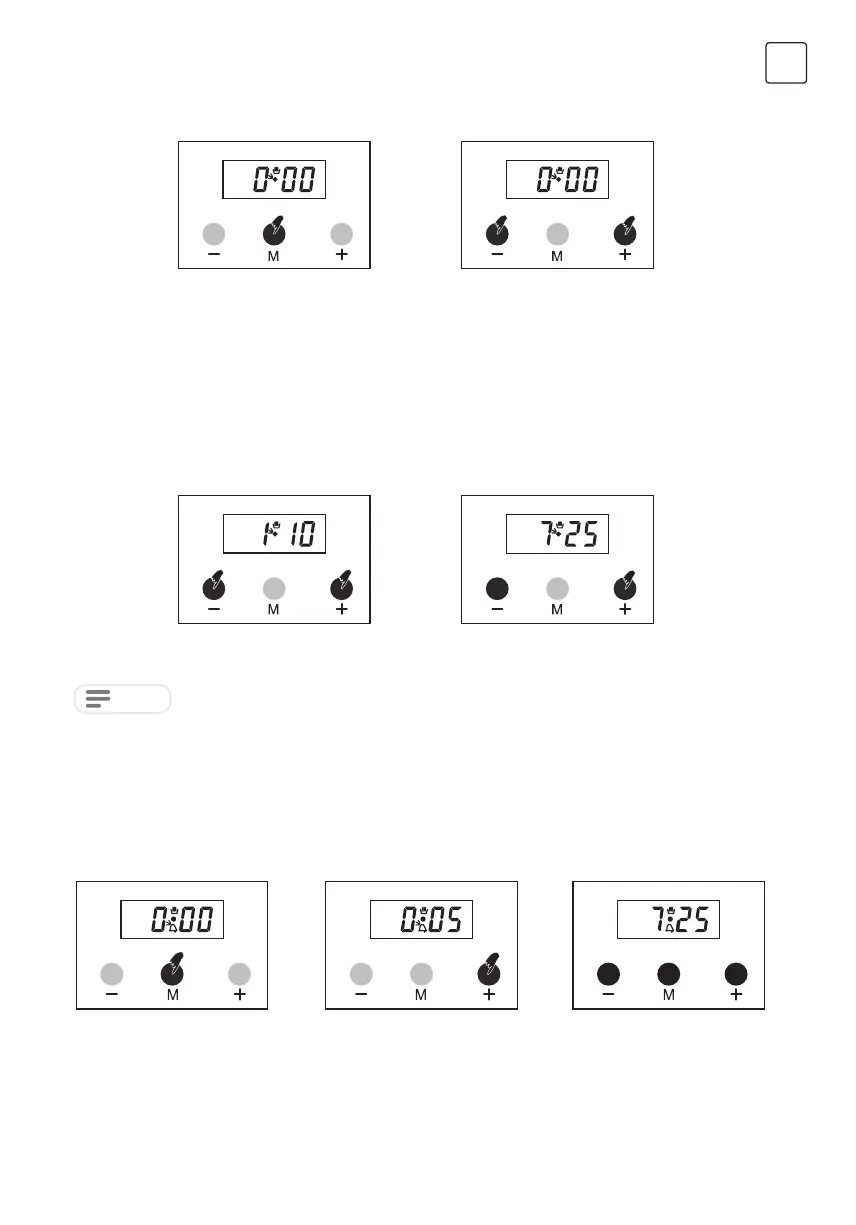
Manual mode
Time of day adjustment
Adjusting the buzzer alarm
or
1. Press ‘M’ button in order to
enter enter manual mode.
1. Press + and – simultaneously.
1. Select adjusting the buzzer
alarm pressing ‘M’ button once.
icon will flash.
This adjustment can only made when no cooking program is in progress. First, press buttons + and –
simultaneously. Then adjust the clock forward direction using + button and reverse direction using – button. Long
presses of those buttons will result in fast changes.
With this feature, you can program after how much elapsed time you should be warned by a buzzer sound.
2. Press + and – buttons
simultaneously in order to
manual mode.
2. Using + or – buttons adjust time
of the day.
2. Give in the period of time with
the ‘+’ or ‘–’ buttons.Ex; 5 min.
3. A few seconds later,
the screen will return to
displaying the current time
of the day.
NOTE
Unless the + or – buttons are pushed along 5 seconds, time of the adjustment mode will be end up automatically.
If you want to finish time of the adjustment mode rapidly, you should press + and – buttons simultaneously.


 To Next Page