NOTE: On roads where the map data
determines that a conditional speed limit
exists (for example, a speed limit based on
time of day or weather conditions), a second
speed limit displays below the first speed
limit. It is the driver's responsibility to
determine whether the conditional speed
limit is currently in
eect and adjust the
driving speed accordingly.
Set the Cruising Speed
You can set the cruising speed to either:
•
Your current driving speed. The minimum
speed you can set is
30 km/h and the
maximum is 150 km/h. It is the driver's
responsibility to cruise at a safe speed
based on road conditions and speed
limits.
•
The speed limit, plus any oset you have
specified (see Speed Assist on page
124).
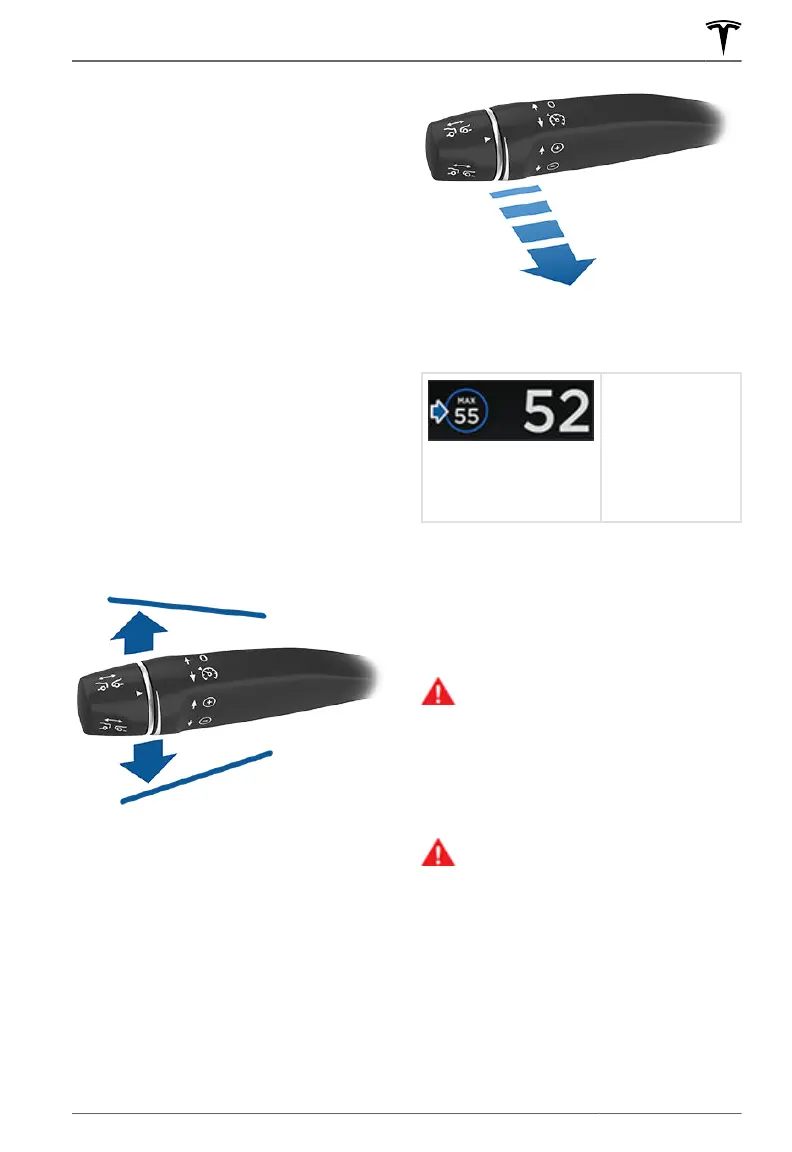
To set the cruising speed to your current
driving speed, move the cruise control lever
up or down.
To set the cruising speed to the speed limit
plus any
oset you've specified using Speed
Assist, pull the cruise control lever toward
you. If you are already driving faster than the
speed limit, the set speed does not adjust to
the speed limit—it adjusts to your current
driving speed. If you move the cruise control
level up or down after setting
Trac-Aware
Cruise Control to cruise at the speed limit,
your set speed becomes your current driving
speed.
After setting the cruising speed, release the
accelerator pedal to allow Trac-Aware
Cruise Control to maintain your set speed.
When the
cruising speed is
set, the
speedometer icon
on the instrument
panel turns blue
and displays the
set speed.
NOTE: Double-pulling the cruise control lever
toward you engages Autosteer (assuming it
has been enabled as described in
Autosteer
on page 99). In this case, if you are not
already cruising at a set speed, the cruising
speed is set to either your current driving
speed or the speed limit (plus any
specified
oset), whichever is greater.
WARNING:
When you adjust the
cruising speed based on the speed
limit, the set speed does not change
when the speed limit changes. You
must pull the cruise control lever again
to cruise at the new speed limit. You
can also manually adjust your cruising
speed at any time (see Changing the
Set Speed on page 95).
WARNING:
Do not rely on Trac-
Aware Cruise Control or Speed Assist
to determine an accurate or
appropriate cruising speed. Always
cruise at a safe speed based on road
conditions and applicable speed limits.
Cruising at the Set Speed
Trac-Aware Cruise Control maintains your
set cruising speed whenever a vehicle is not
detected in front of
Model S. When cruising
behind a detected vehicle, Trac-Aware
Cruise Control accelerates and decelerates
Trac-Aware Cruise Control
93Autopilot



 To Next Page