03
9
10
11
12
13
14
2019 09-24 08:00-
04
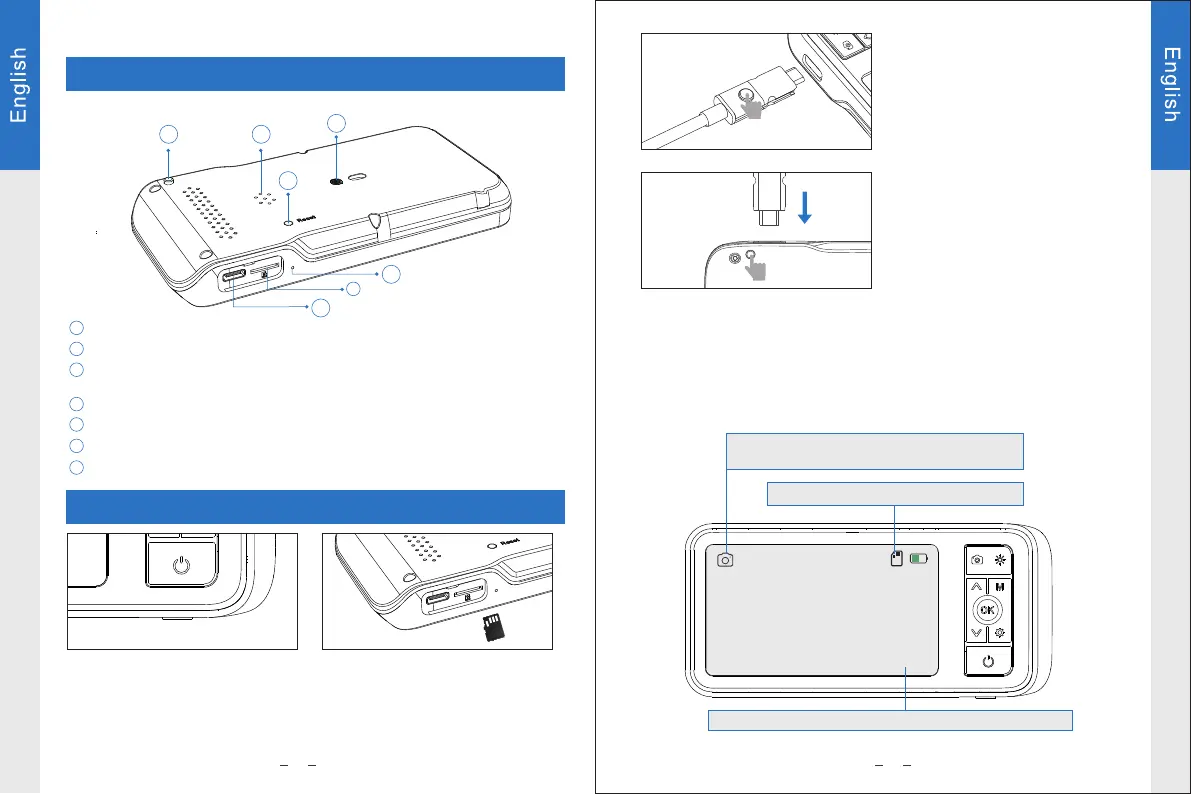
Press this button and pull out the TYPE-C
plug of the probe from the monitor.
Camera probe lock( Press this button to unlock and pull out the
camera probe)
Note:Connect camera probe before
turning on device.Restart device after
replacing camera probe.
Notice: When connecting a dual lens
camera probe, please press this button
to switch the front and side lenses.
10
9
11 12
13
14
15
15
The device is equipped with a TF
memory card(inserted). Gently press
to eject the card.
Long press the power button to turn
on/off device.
TF card slot
Charging port
Speaker
Installation hole of Screen bracket
Reset button
Microphone
Functions
Insert TF card:
*please power off device first before insert TF card.
*please make sure the direction and the front and back sides is correct when
insert the TF card.
*Do not use excessive force when inserting or removing the TF card to prevent
damages of card slot structure.
Mode: Press “M” to switch the three modes:
photo taking/video recording/playback
TF card status: TF card inserted/no card
Date and time: modify the date and time in Settings menu
Instructions


 To Next Page