GB User Manual
Fe type is applicable for nonmagnetic coatings on ferromagnetic substrates, e.g., zinc,
chromium, copper, tin, or paint, plastics, enamel on iron or steel.
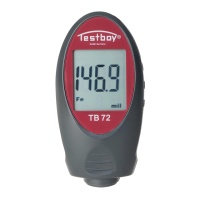
A symbol Fe is displayed on the screen.
NFe type is applicable for electrically non-conductive coatings on non-ferrous metals, e.g.,
paint, enamel, or plastics on aluminum, brass, or zinc and anodic coating on aluminum.
A symbol NFe is displayed on the screen.
2 in 1 type combines two probes in one meter and automatically identify the substrate
materials.
Depending on the substrate, the symbol Fe or NFe is displayed on the screen.
Operation Method:
Hold the gauge and push the integrated probe vertically against the costing surface turns
on the power and starts the measurement automatically, and power is cut off after 30
seconds.
Keep the probe on the coating and hold it steadily for a while till the buzzer sounds, take up
the gauge and read the measurement.
Unit of measurement:
Press the button "μm/mil" to switch between micron (μm) and mil.(mil).
Flip display:
Press the button "Flip" to turn the display upside down for easy reading when measurement
is taking on top, side or bottom surfaces.
Data storage:
Press the button "MEM" to read the final 10 measurements, "0" displays at lower corner of
LCD screen, the final 10 measurements can be shown in sequence by pressing the button
"+/-".
Calibrations:
a. Zero calibration: press "+" for 2 seconds, "000" displays on the screen, then take a
normal measurement on uncoated metals, the reading is calibrated to zero automatically.
b. Calibration with standard films: after measuring the calibration film, press "MEM" for 2
seconds, then adjust the reading to the right value by pressing "+/-".
c. Restore factory defaults: press "-" for 2 seconds, "0, 00, 000 …" displays in sequence on
the screen, the factory defaults are restored. The function is useful when standard films are
not available for calibration.
Substrate blocks and standard films:
Available with the package for calibration or self test.


 To Next Page