Operation
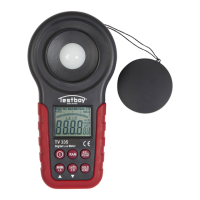
Testboy
®
TV 335 29
MAX/MIN/LS
Using the MAX/MIN function, the respective largest and small-
est measurement value can be indicated. In order to deactivate
the function, press the button “MAX/MIN” as often as required
until the function required appears on the display, or until “MAX“
or "MIN“ is no longer visible. By pressing for a longer period,
"LS L X“ (light source) appears and the different sources of light
(flashing character) can be selected using the "Up and Down"
arrows and can also be confirmed by pressing for a longer pe-
riod.
L0 Standard source of light A
L1 LED white daylight
L2 LED red light
L3 LED AMBER (yellow) light
L4 LED green light
L5 LED blue light
L6 LED purple light
L7 ~ L9 Standard source of light A
Zero adjustment function
The zero point of the sensor curve can be adjusted by low in-
tensities of light for optimum measurement results. After switch-
ing on the instrument, install the protective cap in order to cover
the complete sensor. By pressing the button “HOLD/ZERO” for
an extended period, the adjustment is started. Wait until the in-
strument is successfully adjusted, indicated by an acoustic sig-
nal. The value 0.00 Lux appears on the display. During adjust-
ment, avoid strong solar radiation.


 To Next Page