4. Initial Operation
23
4. Initial Operation
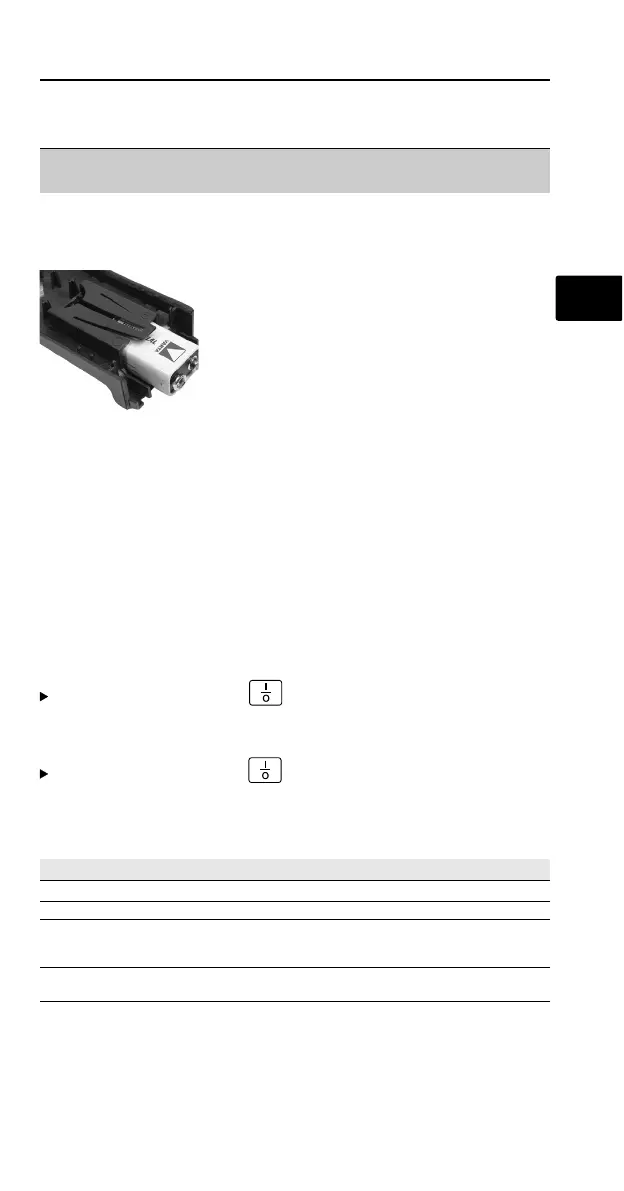
4.1 Putting in the battery
1
Open back of testo 815 using a
screwdriver and remove cover.
2
The battery compartment is located
in the cover.
3
Lift the holding clip for the battery
slightly, remove battery.
4
Put in new 9 Volt block battery. Ensure +/- is correct.
5
Put the cover back on the housing and close using a
screwdriver.
5. Operation
5.1 Switching on/off
Switch on meter: press .
- All segments light up briefly and the meter switches to the
measurement mode (measurement range 32 - 80dB).
Switch off meter: press .
5.2 Setting the meter
The following functions can be set:
Function Description Setting options
Time weighting Sets measurement time Fast or Slow
Frequency weighting Sets weighting, A or C
Level Switches over 32 to 80dB
measurement range 50 to100dB
80 to 130dB
Hold function Switches on MAX / MIN
Max Hold/Min Hold Function
en


 To Next Page