Usage and Storage Instructions 5
EN
English
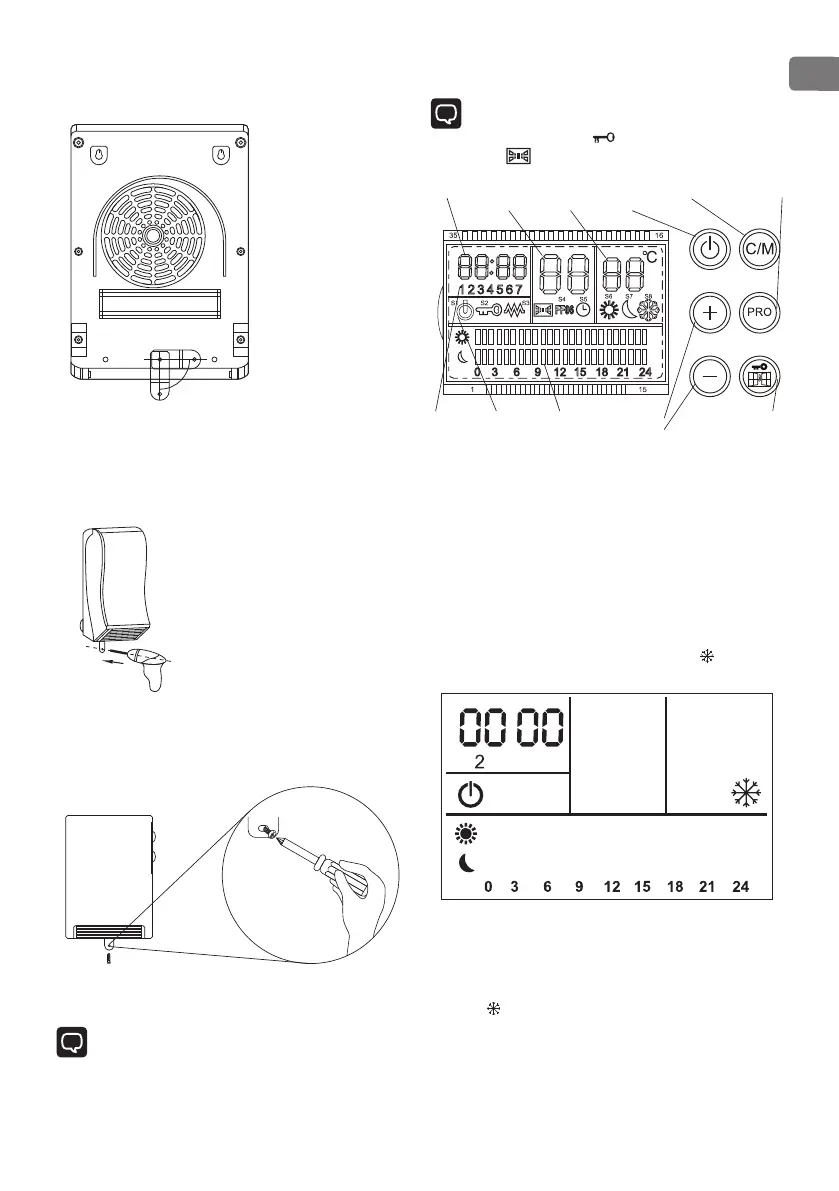
5. Hang the appliance on the screws.
Mark the drill hole for screwing the fastening bracket
6. Take the appliance off the wall and drill the
corresponding hole.
•
Using a 6 mm bit, drill a hole to fit the wall plug.
•
Insert a wall plug.
7. Hang the appliance again on the screws.
8. the fastening bracket securely to the wall using a
screw.
OPERATING
Note: As the appliance and heating elements are
supplied with a thin film of grease, there might be a
small amount of smoke and odour the first time the
appliance is used. This is not harmful and will stop after a
short while. Please ensure in the meantime that there is
sufficient ventilation)
CONTROL PANEL
Note: The screen will be locked when the device is on
or in any mode if without any operation after 1
minute. Screen will display Unlock the screen Pressing
and holding in 3S
Timer/min
Week
Working
mode
Working
situation
PRO setting
display
PRO detail
per day
Stand by /
Power on
"+” add
“-” less
Exchange PRO
Open window
and Lock
HEATING OPERATION
•
The device is equipped with a frost protection function
which will automatically switch to the high heat output
as soon as the room temperature falls below 7°C. When
the room temperature reaches 9°C the appliance will
automatically switch back to standby mode.
•
Activate the main switch to switch the device on. The
device is now in standby mode. On the display the
symbol for the frost protection function lights up
The device now will switch on if the room temperature
drops below 7°C.
On the display the symbol for the frost protection
function blinks.


 To Next Page