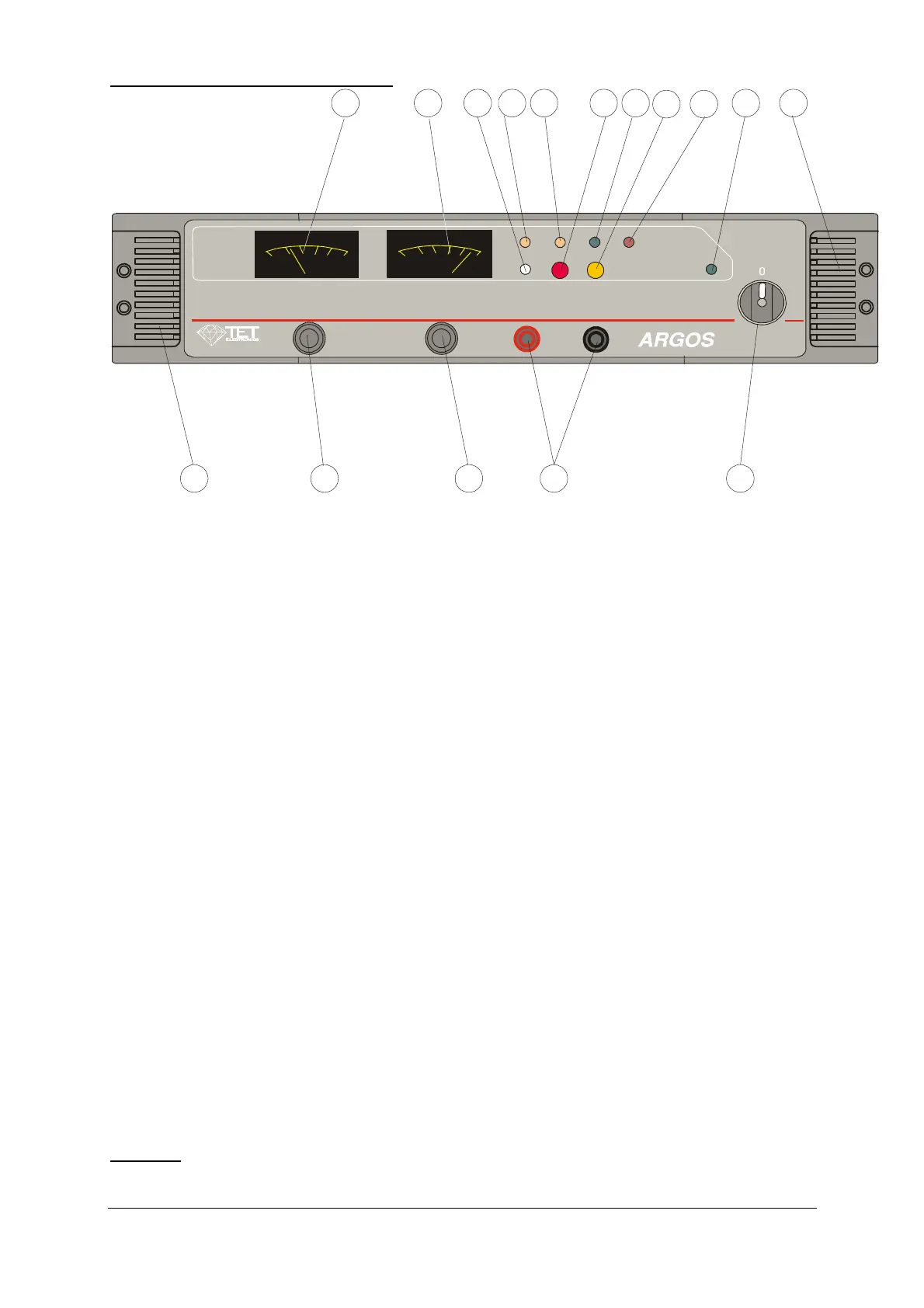
1. Frontpanel layout description
1
POWEREXTERN
REN OT
OV-RES
CV
OV-ADJ
CC
VOLTAGE CURRENT
V
0
4
8
12
16
20
A
0
25
50 100
200
250
+ TEST -
14
4
513
1
14
2 3 10 12
156
7
11
89
Fig. 1
1 Power switch
2 Voltage output display
3 Current output display
4 Voltage adjustment control (10 turn pot)
5 Current adjustment control (10 turn pot)
6 External/internal switch and External LED indicator
7 Remote enable indicator
8 LED indicator for constant voltage mode
9 LED indicator for constant current mode
10 Adjustment control for the OV-protection
11 Overvoltage reset button and overvoltage LED indicator
12 Power ON indicator
13 Test sockets for output voltage
14 Ventilation slits
15 Overtemperature (OT) indicator
CAUTION
The test sockets (13) are not appropriate to draw current
Argos 1200
Page 4 von 16 ISSUE 07/05



 To Next Page