EasyManua.ls Logo

Tevion Music/Audio Converter - User Manual

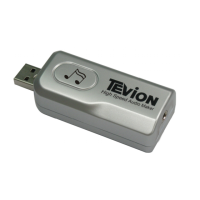
Tevion Music/Audio Converter
12 pages
Print Icon
To Next Page IconTo Next Page
Loading...
Helpline No.: UK/N. Ireland: 08 458 684 540 Rep. of Ireland: 076 60 600 29 1
Web Support: www.unisupport.net P50528
Music/Audio Converter
User Manual
After Sales Support
Having purchased a TEVION Music/Audio Converter you can rest assured in the
knowledge that in addition to your 3 year parts and labour warranty you have the
added peace of mind of dedicated help lines and web support:
Question and Answer IconNeed help?

Do you have a question about the Tevion Music/Audio Converter and is the answer not in the manual?

Summary

Getting Started

Software Installation

Guide to installing the included software.

Software Installation Guide

Roxio Record Now 9 Installation Steps

Detailed instructions for installing Roxio Record Now 9.

Roxio Record Now 9 Installation Details

Completing Roxio Record Now 9 Installation

Installation Process and Completion

The actual installation and completion screens.

Audio Capture with Roxio Record Now 9

Audio Capture Workflow

Steps to capture audio using the software.

Easy Audio Capture Settings

Configuring capture format and recording levels.

Roxio Record Now 9 Feature Introductions

Convert LPs and Tapes to Digital

Process for converting analog media to digital.

FAQ and System Requirements

Warranty Information

Product Warranty Terms

Details of the 3-year warranty.

Fault Reporting and Support

Tevion Music/Audio Converter Specifications

General IconGeneral
BrandTevion
ModelMusic/Audio Converter
CategoryMedia Converter
LanguageEnglish