This document describes the Tevion USB Turntable, a device designed for playing vinyl records and converting them to digital format via USB. The manual provides detailed instructions for setup, operation, maintenance, and troubleshooting, along with after-sales support information.
Function Description:
The Tevion USB Turntable serves a dual purpose:
- Vinyl Playback: It allows users to play traditional vinyl records at various speeds (33 and 45 RPM).
- USB Conversion: It can connect to a computer via USB to digitize vinyl records using the Audacity software, enabling users to preserve their analog music collection in a digital format.
Important Technical Specifications:
While specific detailed technical specifications like power consumption or output wattage are not explicitly listed, the manual highlights several key operational aspects:
- Power Source: The unit operates from a standard AC power source, with a specified voltage of 240 volts for mains connection.
- Connectivity: It features a USB jack for connection to a computer and LINE OUT RCA jacks for connecting to external audio systems (TV, home entertainment receiver, or other music systems).
- Stylus: The turntable uses a replaceable stylus, with instructions provided for both removal and installation.
- Record Speeds: It supports playing records at different speeds, indicated by a "SPEED CONTROL SWITCH." The manual specifically mentions playing 45 RPM records with a large center hole using an included adapter.
- Software Compatibility: It is designed to work with Audacity software for USB conversion, with an installation disc included and the latest version available for download.
Usage Features:
The turntable offers several user-friendly features for both playback and digitization:
- Easy Setup: The manual provides clear, step-by-step instructions for initial setup, including removing packaging, connecting to AC power, and adjusting the phonograph chassis balance screw if needed.
- Record Playback Controls:
- POWER SWITCH: To turn the unit on and off.
- SPEED CONTROL SWITCH: To select the appropriate playback speed for the record.
- TONE ARM: For positioning the stylus on the record.
- SECURITY HOOK and TONE ARM REST: To secure the tone arm when not in use.
- CUE-LEVER: To gently raise and lower the tone arm onto the record, preventing damage to the stylus and record.
- PLAY BUTTON: To continue playing.
- STOP BUTTON: To stop playback.
- EJECT BUTTON: To retract the tone arm back to the arm-rest automatically.
- Automatic Tone Arm Return: The tone arm automatically returns to the arm-rest at the end of a record.
- Volume Control: The manual instructs users to adjust the volume using the On/off Knob or Volume knob of the connected external unit.
- Digitization Process:
- USB Connection: A dedicated USB jack allows for direct connection to a computer.
- Audacity Software: The included Audacity software facilitates the recording process. Instructions cover installing the software and USB driver, and configuring Audacity settings (Audio I/O, recording device, channels, and export format) for optimal recording.
- Volume Adjustment: Users can adjust both input and output volumes within Audacity to ensure proper recording levels.
- Accessories: An adapter for 45 RPM records with large center holes is included.
Maintenance Features:
The manual emphasizes several maintenance aspects to ensure the longevity and optimal performance of the turntable:
- Cleaning:
- General Cleaning: Unplug the product from the wall outlet before cleaning. Use a damp cloth; avoid liquid or aerosol cleaners.
- Stylus Cleaning: Do not touch the stylus to keep it clean.
- Cabinet Cleaning: Do not use chemical solvents as they may damage the finish; use a clean, dry cloth.
- Stylus Replacement: Detailed instructions are provided for safely removing an old stylus and installing a new one, ensuring proper function and sound quality.
- Storage and Handling:
- Power Disconnection: Unplug the power cord from the wall outlet when not in use for extended periods, such as during vacations, or to completely shut off power.
- Environmental Considerations: Choose an installation location carefully, avoiding direct sunlight, heat sources, vibrations, excessive dust, cold, or moisture. Keep away from humming sources like transformers or motors.
- Condensation Prevention: If moving the player from a cold to a warm environment, allow 1-2 hours for it to stabilize to the ambient temperature before plugging it in to prevent condensation damage.
- Record Handling: Avoid handling discs with dirty fingers.
- Cord Handling: Always pull directly on the plug, not the cord, when removing it from the wall outlet.
- Troubleshooting (FAQ): A dedicated FAQ section helps users diagnose and resolve common issues such as the unit not turning on or poor sound quality, offering solutions like checking power connections and relocating the turntable away from other devices.
- Safety Information: The manual includes comprehensive safety precautions, advising against opening the cabinet, attempting self-repairs, or exposing the appliance to rain or moisture. It also provides guidance on proper ventilation, power cord protection, and actions to take during lightning storms.
- Disposal Information: Clear instructions are given for the proper disposal of electrical and electronic equipment (WEEE) to protect the environment and human health, advising against discarding it with household waste and to contact local authorities for recycling options.
- Warranty and Support: A 3-year parts and labor warranty is provided, along with dedicated helpline numbers for the UK/Northern Ireland and Republic of Ireland, and a web support address (www.unisupport.net) for after-sales support and warranty claims. A "Fault Report Card" is included for submitting detailed descriptions of issues when sending the product for repair.

 Need help?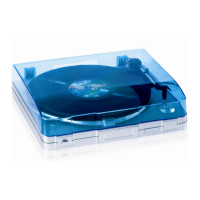

 To Next Page
 General