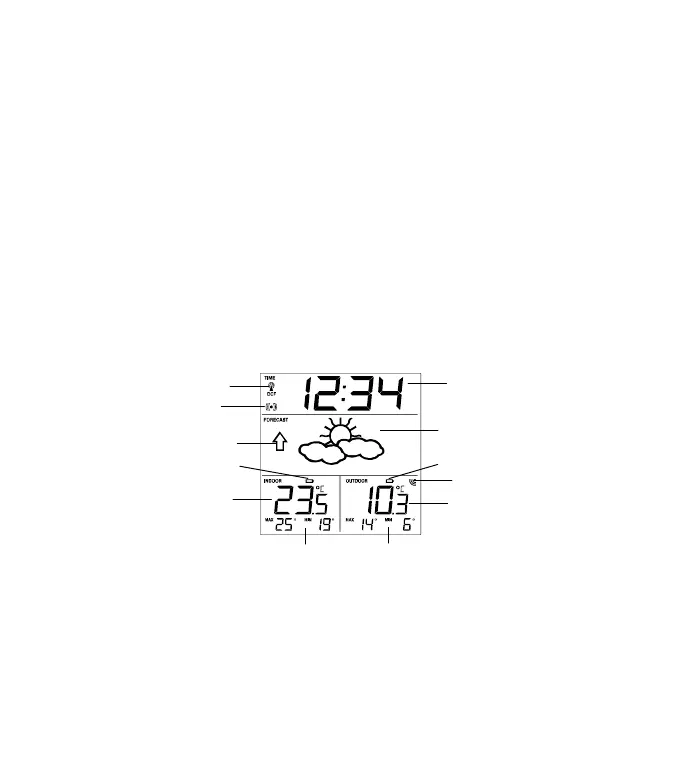
Outdoor Reception
Signal icon*
MIN/MAX indoor
temperature
MIN/MAX outdoor
temperature
Stop the alarm
+ key
To make adjustment for various settings
Stop the alarm
ALARM key
Enter the alarm setting mode
Switch the alarm ON/ OFF
Stop the alarm
MIN/MAX RESET key
Press and hold to reset the MIN/MAX temperature records
Activate the snooze
Exit manual setting modes
LCD SCREEN AND SETTINGS:
* When the outdoor signal is successfully received by the Weather Station,
this icon will be switched on. (If not successful, the icon will not be shown in
LCD) So user can easily see whether the last reception was successful (icon
on) or not (icon off).
Outdoor
Temperature in °C
Weather tendency
indicator
Low battery indicator
(weather station)
Low battery indicator
(transmitter)
Radio controlled time
reception icon


 To Next Page