2322
Digital timer and stopwatch
• Wear chemical-resistant protective gloves and safety glasses when hand-
ling leaking batteries.
Important information on product safety!
• Do not expose the device to extreme temperatures, vibrations or shocks.
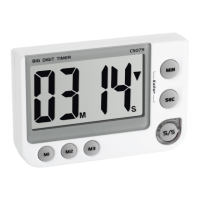
5. Elements
A: Display (Fig 1):
A 1: Minutes A 2: Seconds
A 3: ▲ Symbol for the count up
▼ Symbol for the count down
B: Buttons (Fig 2):
B 1: M1 button B 2: M2 button
Digital timer and stopwatch
B 3: M3 button B 4: S/S button
B 5: SEC button B 6: MIN button
C: Housing (Fig 3):
C1: Alarm volume switch
C 2: Magnets
C 3: Wall mounting bracket (fold out)
C 4: Battery compartment
C 5: Stand (fold out)
6. Getting started
• Pull off the protective foil on the display.
• Slide the lid of the battery compartment downwards and insert two new
batteries (2 x 1.5 V AAA), making sure the polarity is correct.
TFA_No. 38.2024_Anleit_04_21 25.04.2021 17:47 Uhr Seite 12


 To Next Page