2524
Digital timer and stopwatch
• Place the battery compartment lid on the housing and slide it upwards.
• All LCD segments will light up for about a few seconds
• The unit is ready for use.
• Take out the batteries to shut down the instrument.
7. Operation
7.1 Timer
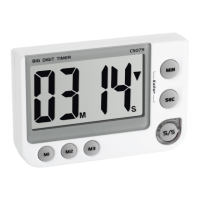
• Push the MIN button to set the minutes and the SEC button to set the sec-
onds of the desired time. Press and hold the buttons in setting mode for
fast running.
• ▼ appears on the display.
• Push the S/S button to start the countdown process.
• During the countdown, the symbol is flashing and the S/S button flashes
in green.
Digital timer and stopwatch
• Use the S/S button to stop and restart the counting.
• After the countdown the symbol ▲ appears in the display, the alarm (60
seconds) will sound and the S/S button flashes in red. Now the timer will
start to count up the elapsed time.
• Press the S/S button to stop the counting and to deactivate the alarm
sound.
• The timer will recall the last selected time automatically.
• Push the MIN and SEC button at the same time to reset the timer.
7.2 Memory function
• Press and hold M1 button for 2 seconds.
• 00:00 flashes on the display.
• Push the MIN button to set the minutes and the SEC button to set the se-
conds of the desired time.
TFA_No. 38.2024_Anleit_04_21 25.04.2021 17:47 Uhr Seite 13


 To Next Page
 Loading...