CXT-200 Corner Multi-Funtional Trainerwww.tu stu tness.com
Step 8
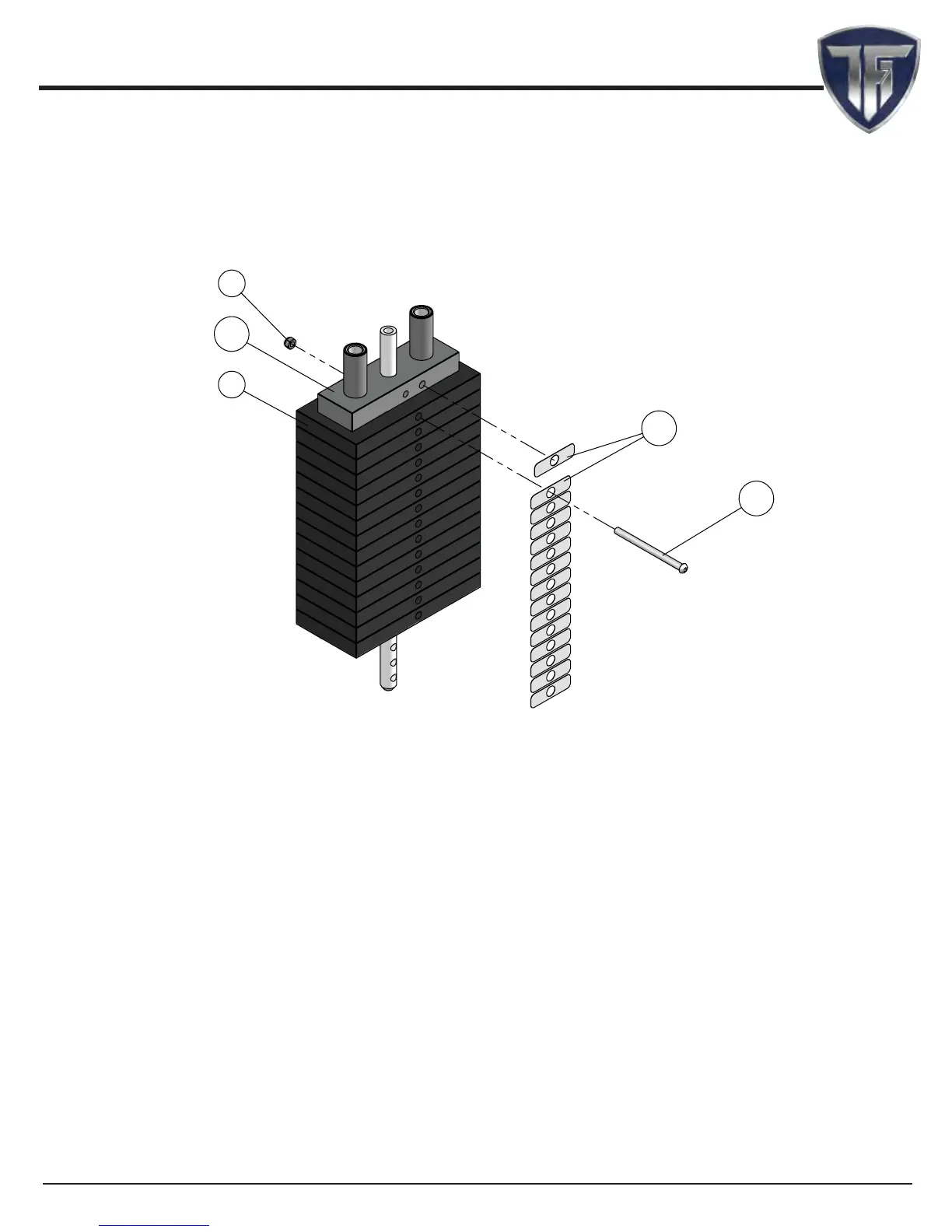
Weight stack label and lubrication instructions
1. Wipe front surface of weight stack with rubbing alcohol and wipe dry.
2. Peel o back sheet (adhesive side) from label (#123) and make sure that the label remains
attached to the application tape.
3. Line up left edge of label sheet with outside edge of weight holes.
4. Line up the rst label to hole on top plate.
5. Make sure label is straight and slowly press into place.
6. Gently remove application tape and rub each label rmly against the weight stack.
7. Allow labels to stand for 2 days to allow adhesive to cure fully.
8. Open the lube package provided and apply a thin lm of lubricant around the rst 3 inches
of the guide rods above the top plate.
9. After the cables are installed, do a set of reps to spread the lubricant thoroughly.
10. Bolt the rst weight plate with speci ed hardware as shown above.
NOTE:
1. TOP PLATE LABEL GOES ON HOLE OFF CENTER AS
SHOWN. LABEL WILL COVER HOLE ON CENTER.
2. AFTER APPLYING LABEL, BOLT THE FIRST WEIGHT PLATE TO
TOP PLATE.
ŗŖŖ
şŞ
ŗŘŚ
ŗŗŘ
řś
20


 To Next Page