
 Need help?
Do you have a question about the The Original Dash Cam 4SK201W and is the answer not in the manual?
Provides information on the FCC compliance statement for the device.
Covers general warnings, notices, Canadian regulations, and battery safety precautions.
Specific safety guidelines related to handling and charging the device battery.
Guidelines for optimal placement and mounting of the dash cam in a vehicle.
Advises against operating the device while driving and notes normal operating temperatures.
Lists the key technical specifications and capabilities of the dash cam.
Details the items included in the product packaging.
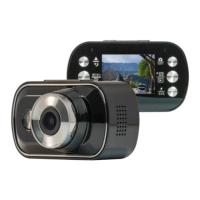
Explains the physical layout and buttons of the dash cam device.
Instructions on how to properly insert and remove the microSD memory card.
Steps for mounting the dash cam onto the vehicle's windshield.
Guide on how to connect the dash cam to the vehicle's power source.
Explains the meaning of different LED light colors and statuses.
Details on how to turn the dash cam on and off automatically or manually.
Instructions for formatting the microSD card for optimal use.
Covers essential initial configurations for the dash cam.
Guide on setting the correct date and time on the dash cam.
Instructions on how to record videos in various modes.
How to configure the dash cam to record a single continuous video file.
Instructions for taking still photos with the dash cam.
How to connect the dash cam to a mobile device via WiFi.
How to playback recorded videos directly on the dash cam's screen.
Instructions on how to delete video and photo files from the dash cam.
Overview of the different menu categories available on the dash cam.
Details the settings available in the video configuration menu.
Details the settings available in the sports mode configuration menu.
Details the settings available in the still photo configuration menu.
Details the system and general configuration settings.
Instructions on how to transfer video files from the dash cam to a PC via USB.
 General
| Video Resolution | 1920x1080 |
|---|---|
| Viewing Angle | 170 Degrees |
| Loop Recording | Yes |
| G-Sensor | Yes |
| Parking Mode | Yes |
| Night Vision | Yes |
| Resolution | 1080p |
| Storage | Micro SD Card |

 To Next Page