— E15 —
Operation
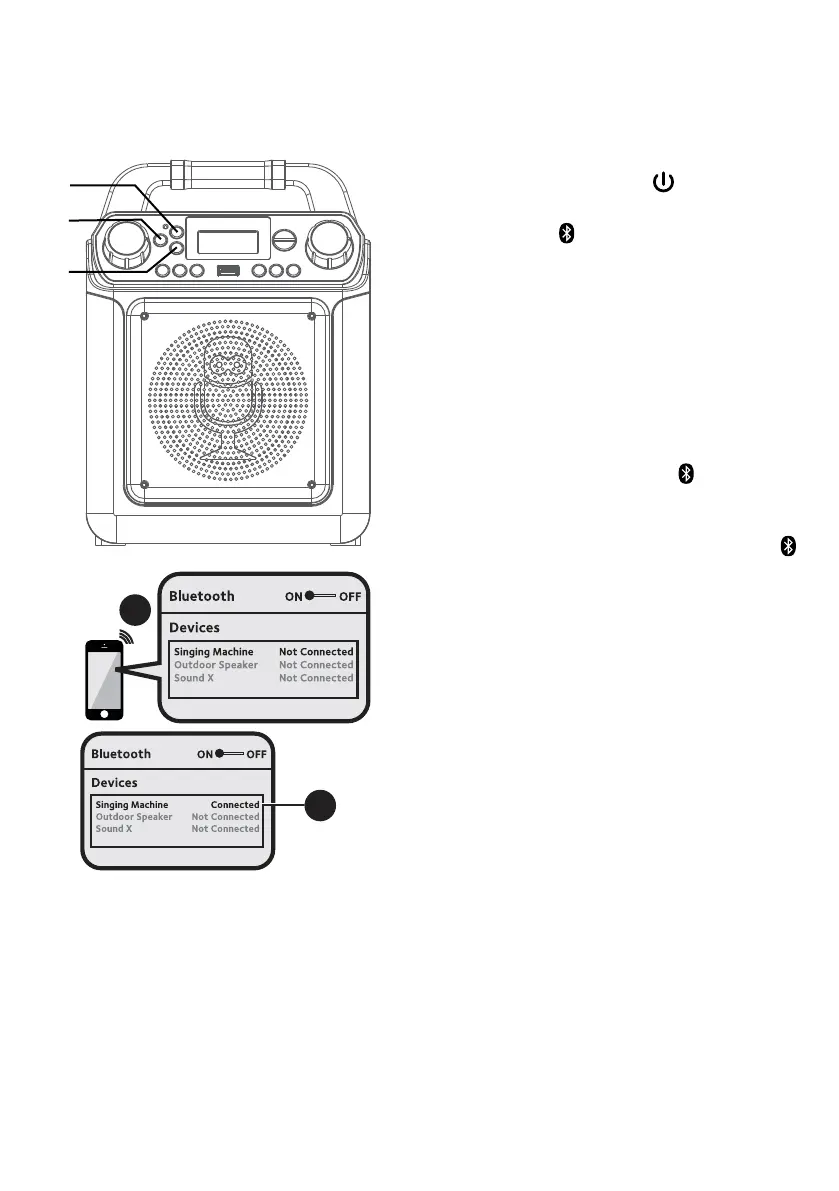
Using a Bluetooth Device
1
Connect the unit as described
previously. Press the button to turn
the unit on.
2
Press the button or repeatedly press
the LIGHTS/FUNCTION button to
select the Bluetooth mode; “bt” will
appear in the display.
The unit automatically searches for
and pairs a previously paired Bluetooth
device (if previously paired). If no
previously paired devices are present
and you cannot find this unit on your
bluetooth compatible device's search
list, press and hold the
button; the
indicator will flash alternatively blue
and red in 60 seconds.
NOTE: You can also press and hold the
button to disconnect any paired devices in
order to pair another device.
3
Turn on your device’s Bluetooth option
in settings to search for a discoverable
device with a Bluetooth signal. Select
“SINGING MACHINE” from the device
results on the Bluetooth menu.
NOTE: Also refer to the user manual of your
Bluetooth device for detailed instructions.
4
The Bluetooth indicator light will turn
solid and a chime will sound indicating
pairing was successful.
NOTES:
• If your Bluetooth prompts you for a passcode
during the pairing process, please enter
“0000” to connect.
• On some Bluetooth devices, once pairing is
completed, select your Bluetooth device as
“Use as Audio Device” or similar.
• If connection is lost after successful pairing,
check to make sure the distance between
speaker and Bluetooth-enabled device does
not exceed 30 feet/10 meters.
3
4
u
v
v















 To Next Page