— E12 —
Operation
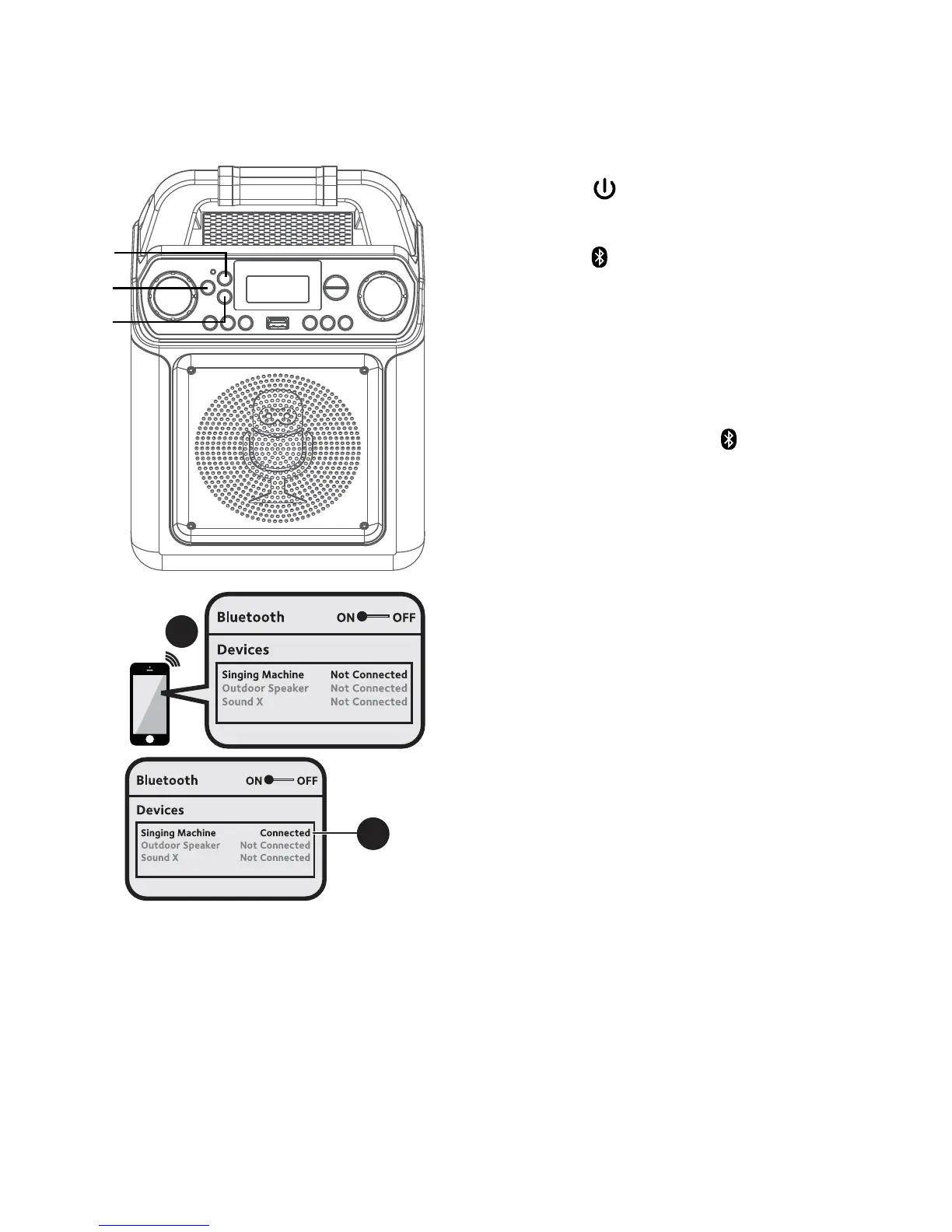
Using a Bluetooth Device
1
Connect the unit as described previously.
Press the ON/STANDBY button to
turn the unit on.
2
Press the button or repeatedly
press the MODE button to select the
Bluetooth; “bt” will appear in the display.
The unit automatically searches for and
pairs a previously paired Bluetooth device
(if previously paired). If no previously
paired devices are present, connect as
shown in the next step.
Note: You can also press the button to
disconnect any paired devices in order to pair
another device.
3
Turn on your device’s Bluetooth option
in settings to search for a discoverable
device with a Bluetooth signal. Select
“Singing Machine” from the device
results on the Bluetooth menu.
Note: Also refer to the user manual of your
Bluetooth device for detailed instructions.
4
The Bluetooth indicator will light solid and
a chime will sound.
Notes:
• If your Bluetooth prompts you for a
passcode during the pairing process, please
enter “0000” to connect.
• On some Bluetooth devices, once pairing is
complete, select your Bluetooth device as
“Use as Audio Device” or similar.
• If connection is lost after successful pairing,
check to make sure the distance between
speaker and Bluetooth-enabled device does
not exceed 30 feet/10 meters.
3
4
u
v
v














 To Next Page