Copyright TheMagicTouch, Germany 2018
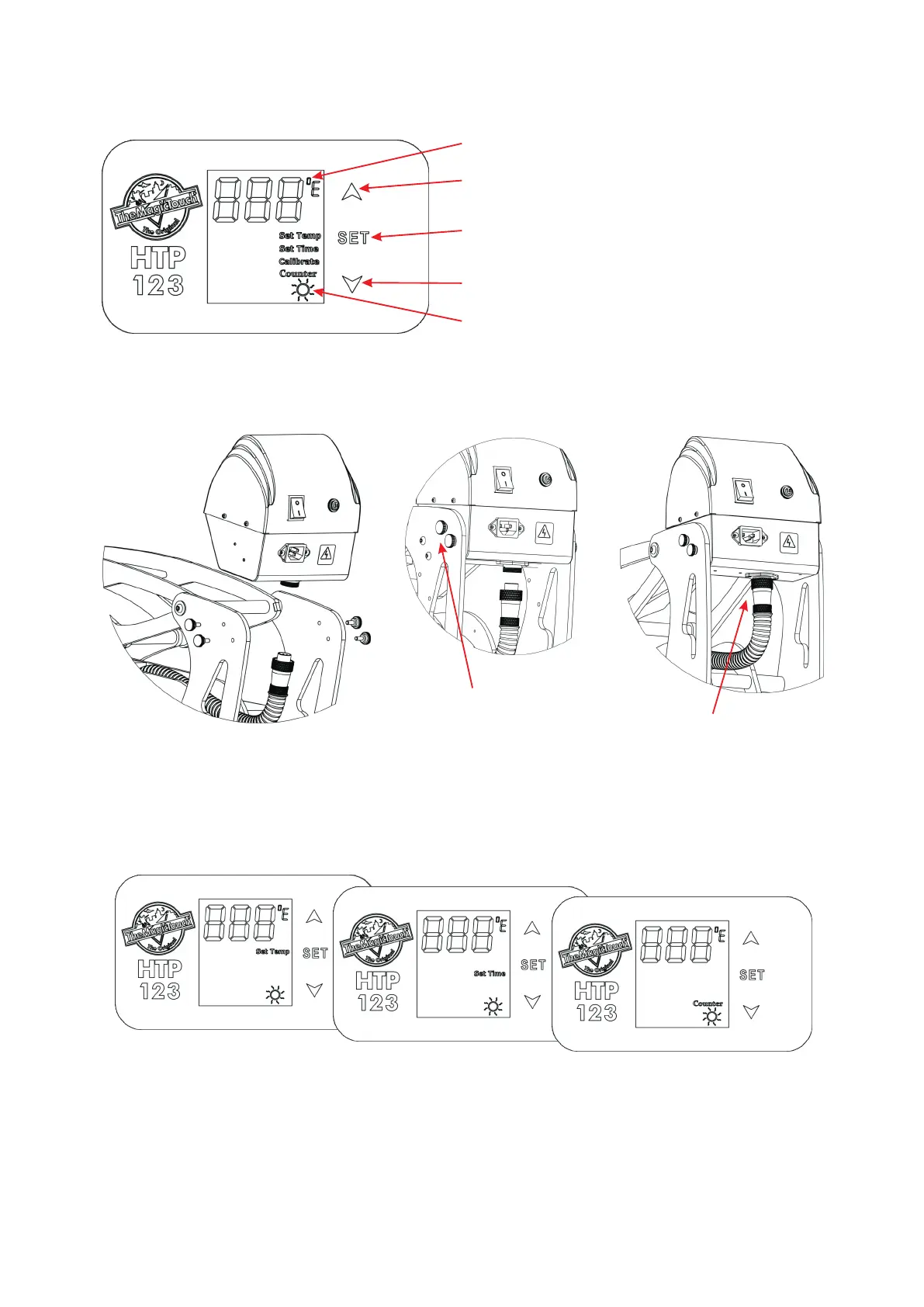
Control Panel Legend
LCD Display
Set Temperature when lit
Up/+ Button
Down/- Button
Mode Selection Button
Set Time when lit
Set Counter when lit
Controller Assembly
1. Insert Controller between
the Frame
2. Insert and tighten the
Hand Screws
3. Attach Heat Platen
Cable and tighten
the Screw Ring
Attach the Power Cable and switch the machine on. The Controller LCD should illuminate.
Adjusting Temperature, Time, Counter and Pressure
Press Set Button > ‘Set Temp’ will be lit > Select Temperature with the Up or Down Button >
Press Set Button again > ‘Set Time’ will be lit > Select Time with the Up or Down Button >
Press Set Button again > ‘Counter’ will be lit > Use the Down Button to re-set Counter to 1.
Press the Set Button again to return to StandBy/Idle. If you don’t need to make changes
just press the Set Button again to skip the Mode. At the end all Mode Indicators must be off
to return to StandBy/Idle.
To adjust the Pressure turn Pressure Knob clockwise to increase the pressure and counter-
clockwise to decrease. High pressure would be the point where you just still can close and
lock the press.
Warm-up when moving
C/F Temperature Range Indicator


 To Next Page