-4-
-5-
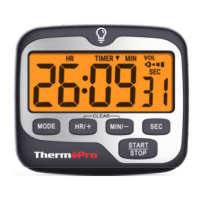
VOL: Press to cycle through the volume settings - off,
low, medium, and high.
“ ”: Press to activate a backlight, if no further button
presses for 10s, the backlight will automatically turn
off.
Start a Countdown Timer
1. Power on the timer and it should be in the default
TIMER mode. If not in TIMER mode, press the MODE
button to switch between modes.
2 Press "HR/+" to set the hour, press "MIN/-" to set
the minutes, press "SEC" to set the seconds. Press
and hold the buttons to increase digits rapidly.
.
3 Press "START/STOP” to start the timer or pause
the timer.
.
4 To clear the timer to zero, press “START/STOP” to
pause the timer, then press "HR/+" and "MIN/-" at
the same time.
.
5 When the countdown timer reaches 0:00:00, the
.
Buttons
MODE: Switch between TIMER/CLOCK function.
HR/+: Press to set the hour in the TIMER mode and
increase the digits of hour in CLOCK mode. Press and
hold to quickly scroll through digits; Select between
12/24 hour clock.
MIN/-: Press to set the minute in the TIMER mode and
increase the digits of minute in CLOCK mode. Press
and hold to quickly scroll through digits; Select
between 12/24 hour clock.
SEC: Press to increase the digits of second in CLOCK
mode. Press and hold to quickly scroll through digits.
START/STOP: Press to start or to pause in the TIMER
mode; Select between hour/minute/second in CLOCK
mode.
EN EN


 To Next Page