-6-
-7-
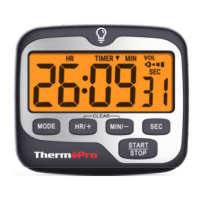
Adjust alarm volume
The timer has 4 alarm volume settings, press “VOL” to
select between off, low, medium and high
Backlight feature
Pressing any buttons or press touchable backlight
button will activate a backlight, if no further button
presses for 10s, the backlight will automatically turn off.
timer will beep and flash for 1 minute and start to
count up. Press "START/STOP” to stop the alarm.
Start a Count Up Timer
1. Press "HR/+" and "MIN/-" together to clear all digits.
2.Press “START/STOP” to start to count up function,
and press “START/STOP” to pause it.
Set CLOCK
1. Power on the timer, and press “MODE” to select
CLOCK.
2 Press and hold the "START/STOP” button to choose
between 12-hour or 24-hour time. Press "HR/+" or
"MIN/-" to switch between 12Hr and 24Hr then press
the "START/STOP” button again to confirm your
selection.
.
3 Press "HR/+" to increase the hour or minutes and
.
4 Press "START/STOP” to confirm the correct hour
then repeat for minute as well.
.
NOTE: If no operation for 20 seconds, all the current
flashing digits will be saved as default.
press “MIN/-” to decrease the hours or minutes.
Press and hold the buttons to quickly scroll through
the digits.
=off
=low =medium
=high
EN EN


 To Next Page