4 5
Getting Started
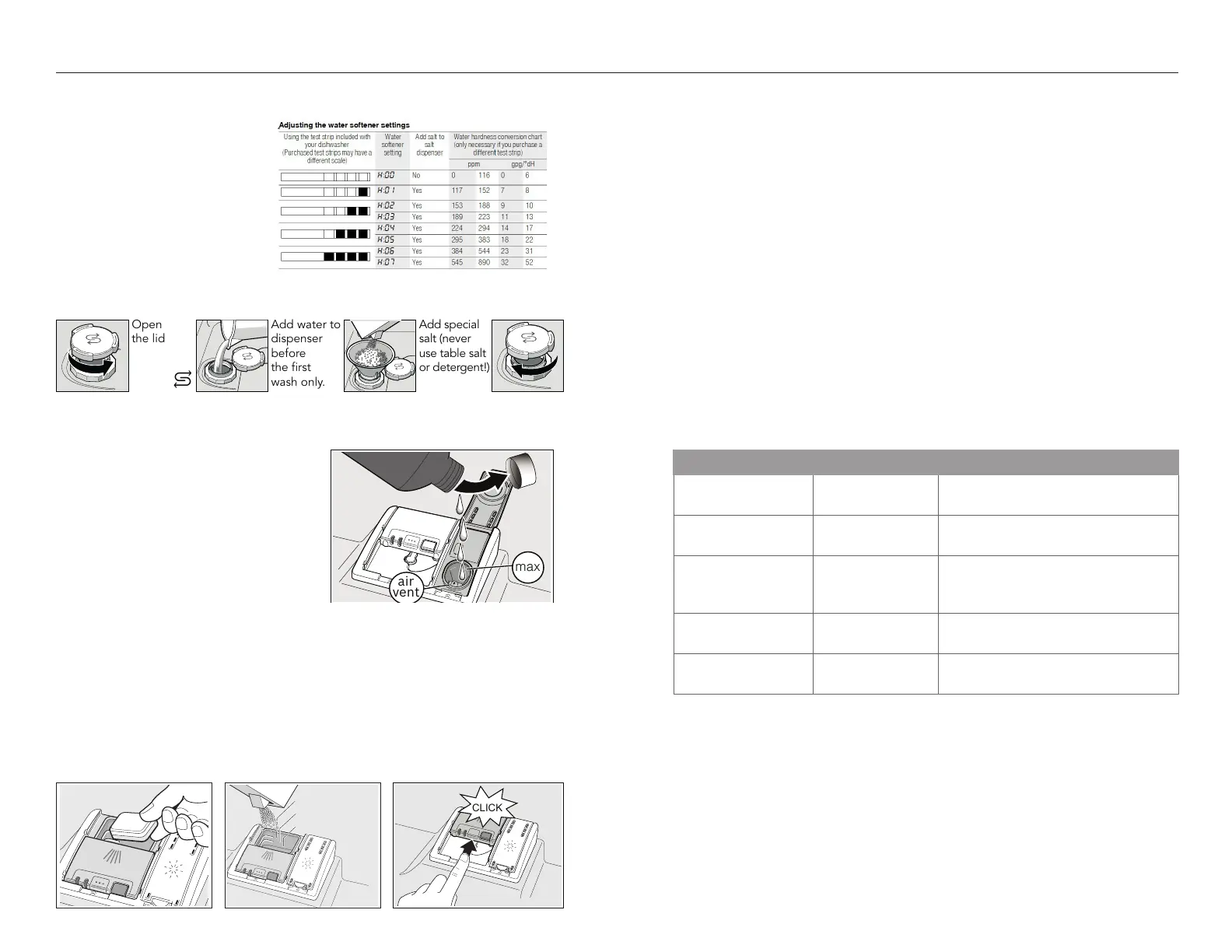
Add salt to the water softener
Add water to
dispenser
before
the first
wash only.
Add special
salt (never
use table salt
or detergent!)
The water softening system
The water softening system
creates optimal washing results.
Ask your water company what
the water hardness is or use the
included water test strip. Set your
dishwasher to the correct setting
according to the table.
See next page on adjusting the
settings.
Add rinse aid
This dishwasher is designed to be used
with rinse aid, which enhances drying
results and shine.
Tip: Remove lid of the bottle for easier
pouring and avoid the air vent.
The amount of rinse aid dispensed can
be adjusted in the settings. Only change
the setting if streaks remain on the dishes
(lower the amount), or if dishes are not
getting dry enough (increase the amount).
Add detergent
Use detergent tabs, fresh powdered detergent or liquid detergent. For quick cycles,
use powdered or liquid detergent instead of tabs.
Tip: dispenser lid should slide closed easily.
1.75 Tbsp. (25 ml)
3 Tbsp. max.
1 Tbsp. (15 ml)
TO CLOSE THE COVER
DETERGENT AMOUNTSLAY TABS FLAT
Start your dishwasher
1. Press the On/Off button.
2. Select a cycle and option if desired.
3. Press Start.
Tip:
After pressing Start, the door must be shut within 4 seconds, otherwise the
operation will be paused. If the door is open for more than 4 seconds, or there is
any other cycle interruption, the Start button needs to be pressed again.This is to
protect against unintentional operation, e.g. by children.
Adjusting the settings
Tip: The simplest way to change the settings is with the Home Connect
TM
app.
Listed below are some of the most used settings. To see all the settings, refer to
the full online manual or go to Dishwasher » Settings in the Home Connect app.
Setting Factory setting Description
• Water hardness
•:‹‹ - •:‹ˆ
•:‹‹ Setting the water hardness.
§-Rinse Aid
§:‹‹-§:‹‡
§:‹† Dispenses the amount of rinse aid,
which aects drying.
š-Intensive drying
š:‹‹-š:‹‚
š:‹‹/ o Improved drying for glasses and
plastic, by increasing the tempera-
ture and cycle length.
›-Buzzer signal
›:‹‹-›:‹„
›:‹ƒ
The volume of the signal for the end
of cycle.
§“-Factory reset
§“
Restores the factory settings on the
dishwasher.
Changing settings on the dishwasher control panel:
1. Press the On/Off button.
2. Press and hold down Setup button (see pages 6-7) for 3 seconds to access
the settings menu.
3. Press the Setup button to scroll through the different settings.
4. Adjust the settings using the + and - buttons.
5. Press and hold the Setup button for 3 seconds to save.





 To Next Page