
 Need help?
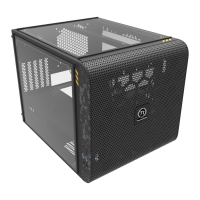
Do you have a question about the Thermaltake Core V21 and is the answer not in the manual?
Provides technical data including case dimensions, materials, cooling, drive bays, expansion slots, and clearance limits.
Lists all parts, their quantities, and their intended uses, such as screws, brackets, and cable ties.
Specifies maximum height for CPU coolers and maximum length for VGA cards to ensure proper installation.
Instructions on how to remove the side panel of the computer chassis for access to internal components.
Step-by-step guide for installing the Power Supply Unit (PSU) into the chassis.
Guidance on properly mounting the motherboard within the computer case.
Instructions for installing both 3.5-inch and 2.5-inch Hard Disk Drives (HDDs) into the chassis.
Specific steps for mounting 2.5-inch Hard Disk Drives (HDDs) in their designated locations.
Guidance on how to install expansion cards into the PCI slots of the motherboard.
Details on mounting fans and airflow components for optimal air cooling.
Instructions for installing liquid cooling radiators and components.
Steps for mounting various brackets for fans, radiators, or other components.
Information on where to connect the front panel I/O connectors like USB and audio.
Instructions on how to securely stack multiple units of the computer case.
Connects front panel LEDs, switches, USB 3.0, and audio connectors to the motherboard.
Details about optional Thermaltake power supply units and their benefits.
Explains the quality, efficiency, and support offered by Thermaltake power supplies.
 General
| Form Factor | Micro ATX, Mini ITX |
|---|---|
| Motherboard Support | Micro ATX, Mini ITX |
| Expansion Slots | 5 |
| Maximum GPU Length | 350mm |
| Maximum CPU Cooler Height | 185mm |
| Maximum PSU Length | 200mm |
| Case Material | SPCC |
| Cooling System | 1 x 200mm fan (front) |
| Radiator Support | Front: 280mm, Top: 280mm, Rear: 120mm |
| Weight | 6.5 kg |
| Dimensions | 336mm x 320mm x 424mm (13.23 x 12.6 x 16.7 inch) |

 To Next Page
