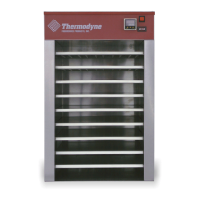
The Thermodyne Foodservice Products, Inc. device is a series of heated holding cabinets designed for commercial kitchen use. These cabinets utilize a unique conduction heating system to maintain precise temperatures, allowing for extended holding times of various food products without compromising their appearance or taste. The manual emphasizes proper installation, operation, and maintenance to ensure years of satisfactory performance.
Function Description
The primary function of the Thermodyne cabinet is to hold food products at a desired temperature for extended periods. Unlike convection ovens, these units operate on the principle of conduction, where heat is directly transferred from heated shelves to the food pans. This method ensures even temperature distribution to each shelf, preventing hot spots and maintaining food quality. The cabinets are programmable for specific holding temperatures, with a factory setting of 185°F (85°C) unless otherwise specified.
The device is designed to hold a variety of food products, including those requiring dry, moist, assembled, or wrapped conditions. Different pan configurations are available to suit specific food types:
- Dry Pan Without Pan Screen: Ideal for high-moisture products like sauces, gravies, casseroles, and vegetables, especially those with fast turnover. For crispier products, an optional solid back can be used, and products can be held uncovered or vented.
- Dry Pan With Pan Screen: Used for dry and crisp products, particularly those with high oil content, such as bacon, hot dogs, hamburger patties, breaded chicken patties, biscuits, English muffins, fried fish, fried chicken (vented or no cover), fried sandwiches (vented or no cover), and French toast.
- Wet Pan With Pan Screen: Designed for products susceptible to drying, such as grilled chicken breast, egg products (for sandwiches, sausage links, and patties), hamburger patties (extended holding), bagels, pancakes, and assembled wrapped sandwiches. Water is added to the pan prior to adding food to provide moisture.
- Pans With "V" Rack: Suitable for products like tacos, burritos, assembled hot dogs, small wrapped sandwiches, and hot spring rolls. Water can be added to the bottom of these pans for moisture.
The units feature a temperature controller with a digital display for process value (PV) and set value (SV), along with indicators for output, alarm, manual mode, and auto-tuning. The controller allows users to adjust the set-point temperature, toggle between °F and °C readouts, and manage other parameters.
Important Technical Specifications
The Thermodyne cabinets come in various models with different dimensions, capacities, and electrical requirements.
Dimensions and Maximum Temperature:
- 125OC: 46.0" W x 13.75" D x 5.63" H (Ext.), 42.0" W x 12.0" D x 4.63" H (Int.). Max Oper. Temp: 230°F (110°C). Net Weight: 96 lbs, Shipping Weight: 160 lbs.
- 200NDNL: 17.5" W x 23.0" D x 18.6" H (Ext.), 13.5" W x 22.0" D x 13.0" H (Int.). Max Oper. Temp: 230°F (110°C). Net Weight: 102 lbs, Shipping Weight: 155 lbs.
- 300NDNL: 17.5" W x 23.0" D x 25.9" H (Ext.), 13.5" W x 22.0" D x 20.3" H (Int.). Max Oper. Temp: 230°F (110°C). Net Weight: 123 lbs, Shipping Weight: 185 lbs.
- 700NDNL: 30.5" W x 23.0" D x 27.3" H (Ext.), 26.5" W x 22.0" D x 20.3" H (Int.). Max Oper. Temp: 230°F (110°C). Net Weight: 173 lbs, Shipping Weight: 233 lbs.
- 725NDNL: 30.5" W x 23.0" D x 28.5" H (Ext.), 26.5" W x 22.0" D x 21.5" H (Int.). Max Oper. Temp: 230°F (110°C). Net Weight: 188 lbs, Shipping Weight: 248 lbs.
- 950NDNL: 45.0" W x 23.0" D x 20.0" H (Ext.), 41.0" W x 22.0" D x 13.0" H (Int.). Max Oper. Temp: 230°F (110°C). Net Weight: 170 lbs, Shipping Weight: 310 lbs.
- 957NDNL: 45.0" W x 23.0" D x 27.25" H (Ext.), 41.0" W x 22.0" D x 20.3" H (Int.). Max Oper. Temp: 230°F (110°C). Net Weight: 220 lbs, Shipping Weight: 360 lbs.
- 1600NDNL: 17.5" W x 33.0" D x 61.8" H (Ext.), 13.5" W x 22.0" D x 49.6" H (Int.). Max Oper. Temp: 230°F (110°C). Net Weight: 241 lbs, Shipping Weight: 405 lbs.
- 200CT: 17.5" W x 24.8" D x 20.0" H (Ext.), 13.5" W x 22.0" D x 13.0" H (Int.). Max Oper. Temp: 230°F (110°C). Net Weight: 103 lbs, Shipping Weight: 160 lbs.
- 300CT: 17.5" W x 24.8" D x 27.3" H (Ext.), 13.5" W x 22.0" D x 20.3" H (Int.). Max Oper. Temp: 230°F (110°C). Net Weight: 126 lbs, Shipping Weight: 190 lbs.
- 550CT: 17.5" W x 24.8" D x 41.4" H (Ext.), 13.5" W x 22.0" D x 29.4" H (Int.). Max Oper. Temp: 230°F (110°C). Net Weight: 190 lbs, Shipping Weight: 230 lbs.
- 700CT: 30.5" W x 24.8" D x 27.3" H (Ext.), 26.5" W x 22.0" D x 20.3" H (Int.). Max Oper. Temp: 230°F (110°C). Net Weight: 189 lbs, Shipping Weight: 265 lbs.
- 300OC: 59.0" W x 13.5" D x 14.6" H (Ext.), 55.0" W x 12.5" D x 9.0" H (Int.). Max Oper. Temp: 230°F (110°C). Net Weight: 160 lbs, Shipping Weight: 235 lbs.
- 250PNDT: 21.3" W x 20.0" D x 33.3" H (Ext.), 17.3" W x 19.0" D x 27.6" H (Int.). Max Oper. Temp: 230°F (110°C). Net Weight: 168 lbs, Shipping Weight: 203 lbs.
Fluid Capacities (Standard Shelf Configuration):
- 125OC: 1.5 Gallons (3.78 Liters), 14 oz per shelf.
- 200NDNL/200CT/BW3/BW4/550CT: 1.75 Gallons (6.62 Liters) or 1.7 Gallons (6.44 Liters) or 1.65 Gallons (6.25 Liters), 6 oz per shelf.
- 250OC: 1.65 Gallons (6.62 Liters), 20 oz per shelf.
- 250PNDT/1600NDNL: 2.1 Gallons (7.95 Liters), 6 oz per shelf.
- 300NDNL/300CT: 1.91 Gallons (7.23 Liters), 6 oz per shelf.
- 700NDNL/700CT/700DP: 2.25 Gallons (8.52 Liters), 14 oz per shelf.
- 950NDNL: 2.16 Gallons (8.18 Liters), 20 oz per shelf.
- 300OC: 2.24 Gallons (8.48 Liters), 14 oz per shelf.
- 1200G: 2.22 Gallons (8.40 Liters), 13 oz per shelf.
- 1200DW: 2.3 Gallons (8.71 Liters), 14 oz per shelf.
- 1300G: 2.32 Gallons (8.78 Liters), 13 oz per shelf.
- 1900G/1900DW: 3.02 Gallons (11.43 Liters) or 3.06 Gallons (11.58 Liters), 13 or 14 oz per shelf.
- 2100DW: 3.59 Gallons (13.59 Liters), 20 oz per shelf.
- 6000P: 4.95 Gallons (18.74 Liters), 23.8 oz per shelf.
- 1500DP: 3.01 Gallons (11.39 Liters), 14 oz per shelf.
- 742HW: 2.45 Gallons (9.27 Liters), 14 oz per shelf.
- 744HW: 3 Gallons (11.36 Liters), 28 oz per shelf.
- 1600HZ: 2.5 Gallons (9.46 Liters), Top-14 oz; Bottom-6 oz per shelf.
Electrical Connections:
The units operate on various voltages and wattages, with specific NEMA plug types for US and Canadian markets.
- 120V, 60Hz, 1 Phase, 1750 Watts, 15 Amps: Models 200NDNL, 300NDNL, 200CT, 300CT, 550CT, 300OC. US Plug Type: NEMA 5-15P. CAN Plug Type: NEMA 5-20P.
- 208/240V, 60Hz, 1 Phase, 5250/7000 Watts, 25/29 Amps: Models 700NDNL, 725NDNL, 950NDNL, 957NDNL, 1600NDNL, 700CT, 250PNDT. US Plug Type: NEMA L14-30. (No CAN Plug Type specified for these models in the table).
Minimum clearances for installation are 4" on the back and 2" on at least one side for proper air circulation.
Usage Features
- Programmable Temperature Control: Users can set and adjust the desired holding temperature using the keypad.
- Preheating: The cabinet requires approximately 30 minutes to preheat, after which the set point and actual temperatures will match. Doors should remain closed during preheating.
- Fluid Replenishment: The units use a specialized Thermodyne Heat Transfer Fluid. A "ADD FLUID" light indicates when the reservoir tank needs refilling. The process involves removing a fill cap cover, removing the reservoir tank cap, filling until the light turns off, and then re-installing the caps.
- Extended Shutdown: For extended periods of non-use, the unit should be turned off and cleaned.
- Removable Lids: Lids on food pans are removable for cleaning and sanitization, important for preventing cross-contamination when changing food products.
Maintenance Features
- Regular Cleaning: All stainless steel equipment should be cleaned daily to ensure longevity and prevent abrasion.
- Cleaning Procedure: Use a non-abrasive, non-chlorinated soap solution. Rinse thoroughly with warm water and wipe dry with an absorbent cloth. For heavy soil, use a non-metallic, fine-grain scouring cloth, rubbing in the direction of the metal grain. Avoid steel wool or metallic scouring cloths.
- Cleaning Safeguards: Always rub in the direction of the metal grain. Use recommended dilution for cleansers and rinse thoroughly to prevent buildup. Never use chlorine or bleach solutions, as they can damage stainless steel and aluminum.
- Sterilizing Stainless Steel: Stainless steel can be sterilized using agents containing chlorine compounds, but contact time should be short (up to 2 hours) to prevent pitting. Flush thoroughly with water after sterilization.
- Cleaning Heat Transfer Plates: These are crucial for efficient conduction heating. They must be kept clean to ensure maximum heat transfer. Avoid strong caustic cleaning solutions as they can deteriorate the surface and reduce non-stick properties. Use a clean damp cloth for periodic wiping.
- Stainless Steel Cabinet Cleaning: Any food-service acceptable pot and pan detergent compatible with aluminum and stainless steel can be used. A #20 plastic bristled brush is acceptable. Hot water hose rinsing is preferred, or a sponge/cloth with clean hot water. Avoid contact with the Powerhead.
- Door Gasket (CT Units) Cleaning: Clean the gasket-sealing surface with a cloth moistened in mild detergent and warm water. Rinse with a fresh cloth. Avoid solvents, sharp instruments, food product oils, or petroleum lubricants, as these can damage the gasket.
- Fluid Change: The Thermodyne Heat Transfer Fluid contains lubricating and anticorrosion additives that can degrade over time. It is recommended to change the fluid annually by a qualified service technician. This involves draining the old fluid, refilling with new Thermodyne Heat Transfer Fluid, and purging air from the system.
- Troubleshooting: The manual provides a troubleshooting guide for common issues, primarily related to low fluid levels, electrical problems, or controller malfunctions. Many issues can be resolved by checking the fluid level. For complex problems, a qualified service agency is recommended.


 To Next Page
 General