The Utillian 8 is a premium aromatherapy device designed for ease of use and customizable experiences. It features a unique design with a glass mouthpiece, a BurstHit 3D Heating Chamber™, and a multi-tool that functions as both a filling tool and a carb cap.
Function Description:
The Utillian 8 is designed for vaporizing materials, offering four pre-set temperature levels to cater to different preferences, from flavor-focused to dense vapor production. The device utilizes a BurstHit 3D Heating Chamber™ for efficient heating. Its operation is intuitive, with a single power button controlling on/off, battery level display, and temperature adjustments. The multi-tool enhances the user experience by allowing control over airflow and vapor density through two holes that can be blocked or left open.
Important Technical Specifications:
- Operating Temperature: 0 °C – 40 °C (32 °F – 104 °F)
- Evaporation Temperature (4 levels): 205 °C – 425 °C (400 °F – 800 °F)
- Battery Capacity: 3150 mAh (lithium-ion, rechargeable)
- Size: 18.0 cm x 10.3 cm x 7.0 cm (7.09 in x 4.06 in x 2.76 in)
- Weight: Approx. 450 g (0.99 lb)
- Charging Input: 5 V DC, 2.0 A, 10 W (USB-C charging cable)
Usage Features:
- First Use Recommendations: Fully charge the battery and perform a sanitation cycle (pyrolysis) at the highest temperature setting to remove manufacturing oils.
- Charging: The device charges via a USB-C cable. LEDs on the status interface and under the glass mouthpiece pulse white to indicate charging progress. All LEDs glowing solid white signify a full charge.
- Battery Level Display: Press the power button twice quickly to view the battery level, indicated by the number of illuminated interface LEDs (1-4 LEDs for 0-25%, 26-50%, 51-75%, and 76-99% respectively; all 4 solid white for 100%).
- Filling the Glass Mouthpiece: Fill the glass mouthpiece with water at least above the two air holes, up to roughly half the central cone height. Avoid overfilling to prevent water bursts during inhalation. Do not fill while attached to the base, allow water into the base, or store with a filled mouthpiece.
- Attaching the Glass Mouthpiece: Ensure the hole in the glass mouthpiece aligns with the vapor path in the base for proper airflow. The multi-tool can assist in orienting the mouthpiece. Avoid forceful attachment or detachment.
- Heat Cycle: Press and hold the power button for 2 seconds to initiate the heat cycle. The device vibrates, and status interface LEDs illuminate one by one. Heat-up is indicated by pulsing red LEDs. The device vibrates again after 2 seconds. The heat cycle can be aborted by pressing and holding the power button for 2 seconds, causing the device to vibrate and LEDs to turn off.
- Temperature Levels: The device offers four temperature levels, indicated by the number of illuminated status interface LEDs.
- Level 1 (1 LED): Emphasis on flavor, light vapor.
- Level 2 (2 LEDs): Rich flavor, satisfying vapor, balanced.
- Level 3 (3 LEDs): Rich flavor, intense vapor, nuanced.
- Level 4 (4 LEDs): Massive clouds, faint flavor.
- Material Loading: Material can be loaded directly onto the BurstHit 3D Heating Chamber™. For convenience, place the multi-tool with material on top of the carb cap base, covering the heating chamber. Stickier material will melt onto the chamber when heated.
- Multi-Tool Functionality: The multi-tool serves as a filling tool and a carb cap. It has two holes for controlling airflow and vapor density. Users can block or open these holes with their fingers to adjust the experience.
- Hot/Cold Loading: Users can choose between cold or hot loading, with experienced users often preferring hot loading.
- Device Case Exchange: The textile device case is customizable and can be swapped for different designs available on www.utillian.com. Hold the device case in one hand and push the base out with the other. The new case snaps into place with magnets.
Maintenance Features:
- Cleaning the Heating Chamber: Remove the multi-tool, pull off the carb cap cover, and unscrew the BurstHit 3D Heating Chamber™ from the base. Clean with a cotton swab soaked in 90% isopropyl alcohol. Do not touch heating elements during operation or cooling. Do not use water or water-based cleaning agents on the heating chamber as it is an electronic part.
- Cleaning the Glass Mouthpiece: Remove the glass mouthpiece from the base. Submerge it in isopropyl alcohol to dissolve grime, then rinse with water and allow to dry completely before re-attaching. Do not allow water or water-based cleaning agents into the base.
- Cleaning the Base: Before cleaning the base, remove the multi-tool, carb-cap base, BurstHit 3D Heating Chamber™, and glass mouthpiece. Clean the base, including the golden contact point, and the vapor path with an isopropyl alcohol-soaked cotton swab.
- Vapor Path Removal: The vapor path can be removed by pushing down the end adjacent to the BurstHit 3D Heating Chamber™, which lifts the end near the glass mouthpiece for easy removal.
- Silicone Parts: If silicone parts (like the vapor path) are soaked in alcohol, they may swell and lose shape.
- Glass Inspection: Periodically examine glass parts for cracks or defects. Do not use broken or cracked glass, and handle with care to avoid cuts.
- Cleaning Agents: Do not operate the device if flammable cleaning agents or disinfectants, such as isopropyl alcohol, have not fully evaporated.

 Need help?
 General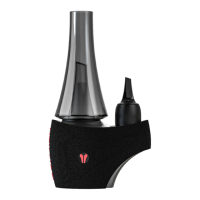

 To Next Page
