timer will beep and flash for 1 minute and start to
count up. Press "START/STOP"to stop the alarm.
Start a Count UpTimer
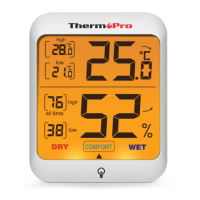
Press"HR/+" and "MIN/-" together to clear all digits.
2. Press "START/STOP"to start to count upfunction,
and press "START/STOP"to pause it.
Set CLOCK
I. Poweron the timer, and press "MODE"to select
CLOCK.
2. Press and hold the "START/STOP" button to choose
between 12-hour or 24-hour time. Press "HR/+" or
"MIN/-" to switch between 12Hr and 24Hr then press
the "START/STOP"button again to confirm your
selection.
3. Press "HR/+" to increase the hour or minutes and
-6-
press "MIN/-" to decreasethe hours or minutes
Press and hold the buttons to quickly scroll through
the digits.
4. Press "START/STOP" to confirm the correct hour
then repeat for minute as well.
NOTE:If no operation for 20 seconds, all the current
flashing digits will be saved as default.
Adjust alarm volume
Thetimer has4 alarm volume settings, press "VOL"to
select between off, low, medium and high
Coff -low -medium -high
Backlight feature
Pressinganybuttons or presstouchablebacklight
button will activate a backlight,if no further button
pressesfor 1Os,the backlightwill automaticallyturn off.


 To Next Page