EasyManua.ls Logo

ThermoPro TP-53 - User Manual

ThermoPro TP-53
14 pages
Print Icon
To Next Page IconTo Next Page
Loading...
English................. 2 Français............... 13
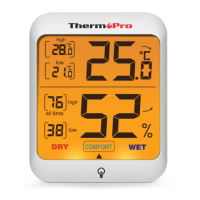
high
LOW
all time
high
LOW
DRY COMFORT WET
Indoor Humidity and Temperature
Monitor Instruction Manual
Model No.: TP-53
V20180822 EN FR
Question and Answer IconNeed help?

Do you have a question about the ThermoPro TP-53 and is the answer not in the manual?

Summary

Indoor Humidity and Temperature Monitor Instruction Manual

General Warning

DANGER! (Safety Precautions)

Critical safety warnings regarding electric shock, high temperatures, fire, and explosions.

NOTE! (Device Handling & Batteries)

Instructions on not disassembling the device and proper battery replacement procedures.

Notes on cleaning

Touch Button

Two Buttons

°C;°F Button

Function of the °C/°F button to switch temperature units.

ALL TIME;24 HRs Button

How to view and reset max/min temperature and humidity records.
Backlight

Before first use

Care of your Humidity;Temperature monitor

Specifications

Declaration of Conformity

Disposal

Limited One-year Warranty

Customer service

Summary

Indoor Humidity and Temperature Monitor Instruction Manual

General Warning

DANGER! (Safety Precautions)

Critical safety warnings regarding electric shock, high temperatures, fire, and explosions.

NOTE! (Device Handling & Batteries)

Instructions on not disassembling the device and proper battery replacement procedures.

Notes on cleaning

Touch Button

Two Buttons

°C;°F Button

Function of the °C/°F button to switch temperature units.

ALL TIME;24 HRs Button

How to view and reset max/min temperature and humidity records.

Backlight

Before first use

Care of your Humidity;Temperature monitor

Specifications

Declaration of Conformity

Disposal

Limited One-year Warranty

Customer service

ThermoPro TP-53 Specifications

General IconGeneral
BrandThermoPro
ModelTP-53
CategoryMonitor
LanguageEnglish

Related product manuals