Note: The minimum setting for the timer is 1 minute. When the
timer counts down below 1 hour 1:00 the display will change to
59'59” display advising 59 minutes 59 seconds. The seconds
will be shown counting down then. When the countdown reaches
0'00” the timer starts counting up and it will beep for 60 seconds.
The timer and “ ” will blink. Press the START/STOP button
to sto p bee pi ng. W he n the cou nt up rea ch es 23:59 :5 9 (59
seconds are not displayed) the display will turn to 0:00, the
unit beeps an d “ ” will bli nk for 60 second s.
Count up
1. Press MODE to select timer mode. The upper display will
s how a small TIMER and 0:00 .
2. Press START/STOP button to start count up. The “ ” will
blink for every second.
3. To stop the count up process , press START/STOP button. The
“ ” becomes solid.
4. Press CLEAR button to clear the setting back to 0:00.
Procedure for typical use on an outdoor grill:
The following typical example will go through the steps to have
the Professional Cooking ,Thermometer alert you to when a beef
steak is cooked to medium
you to rotate hot dogs in 5 minutes.
(USDA doneness level) and remind
1. Please correct load 2*AAA batteries.
2. Place steak and hot dogs on grill rack.
3. Insert probe sensor into the center of thickest portion of the
steak. Avoid touching bone or heavy fat areas. Assume the
meat temperature is 45 F.º
4. Position the probe sensor wire so they will not come into contact
and exit the grill surface area without being pinched/ with flames
crushed by the grill cover.
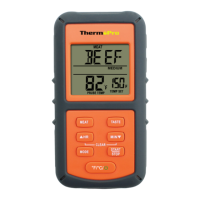
5. Press MEAT so BEEF is displayed.
-4-
-5-
6. Press TASTE so MEDIUM is displayed and 150 F will be shown
as the TEMP SET.
º
7. Press MODE to change to timer mode.
8. Pre ss MI N 5 ti me s to set for 5 mi nu te s so t ha t 0:0 5 is
d is pl ay ed . Pre ss START/ STO P t o sta rt the co un td ow n.
P re ss MO DE to go bac k to thermometer mod e.
10. When the temperature of probe in the steak reaches 55 F
the LCD back light will flash blue.
º
9. When 5 minutes are up the unit will beep for 60 seconds.
11. When the temperature of probe in the steak reaches 135 F
the LCD back light will flash green.
º
12. When the temperature of probe in the steak reaches 150 F º
MEDIUM the nit will beep and the LCD back light will flash
red.
13. Press STOP to turn off the alert.
14. Remove the probe sensor from steak. Always wear a heat
to touch the stainless steel probe sensor or resistant glove
Do not touch with bare hands.wire during or just after cooking.
15. Clean the stainless steel probe and dry thoroughly after
each and every use.
4. Press HR & MIN buttons together to clear the setting back
to 0:00.
2. Pr ess HR and MIN butt on to set the ti mer. Press START/
S TOP bu tto n t o s tar t c oun tdo wn. “ ” will blin k f or every
sec ond.
3. To stop the countdown process , press START/STOP button.
The “ ” becomes solid.


 To Next Page
 Loading...