
 Need help?
Do you have a question about the Thermostats 5265 and is the answer not in the manual?
Ensure the entire installation guide is read and understood before proceeding.
All wiring must conform to IEE 17th Edition and Part P regulations.
Details IP21 rating and RCD protection for bathroom installations.
Key installation precautions for safe setup and operation.
Guide for installing conduit in cavity or concrete walls.
Illustrates thermostat wiring with heating cable, power, and sensor.
Ensuring correct sensor placement and RCD protection.
Max load, sensor placement away from influences, wiring compliance.
Saving settings and optimizing heating schedule for efficiency.
Ensuring settings are saved and optimizing heating schedule.
Descriptions and solutions for thermostat error codes.
The 5265 Thermostat is a programmable device designed for total system control of underfloor heating, offering a step-by-step guide for installation and operation. This guide emphasizes a hassle-free installation process, highlighting potential pitfalls and common errors to ensure a successful setup. The product comes with a 3-year warranty, subject to terms and conditions, covering defects in material or workmanship. Technical support is available via a freephone number for any queries.
The installation begins with preparing the conduit, which is crucial for housing the sensor probe. For cavity walls, the conduit is positioned into the back box and fed down through the wall cavity, with the sensor probe cable fed to its end. For concrete walls, a channel needs to be chased out of the wall and floor, the conduit laid, and then plastered, with the sensor probe fed into it. A key tip is to leave the yellow cap on the conduit and ensure the sensor probe is fully pushed to the end.
For accurate temperature readings, the conduit and sensor should be positioned centrally between two runs of heating cable. The next step involves loosening the face plate by unscrewing the bottom screw with a crosshead screwdriver, ensuring the electrical supply is completely switched off beforehand. Once loosened, the face plate can be removed from the base.
Wiring the thermostat requires careful attention. Before making connections, ensure the base covers the electrical box entirely; if not, a wall plate should be installed at the back of the base. Wires from the heating system should be pulled through and exposed as needed. The tension screws are then loosened to allow the wires to be inserted and fixed. The wiring diagram illustrates connections for the heating cable cold tail, power supply, and sensor probe. A professional tip advises that terminals accept wire thicknesses between 0.32 and 2.1 mm², recommending a cable stripper for sufficient cable exposure.
Safety precautions during installation are paramount. It is crucial to ensure the conduit and sensor are positioned centrally between two runs of heating cable and that the circuit is protected by an RCD. The wiring of the thermostat must exactly match the provided diagram.
After wiring, the back case is fixed to the back box by easing the wires through and exposing them as required, then loosening tension screws to insert and fix the wires. The face plate is then replaced by hinging it back onto the back case until a 'click' is heard, indicating it is secure. Finally, the thermostat is secured into position by tightening the screw under the base with a screwdriver. Before powering up, ensure all adhesives and screeds are fully cured and set according to manufacturer guidelines.
The 5265 Thermostat offers various programming functions for optimal heating control.
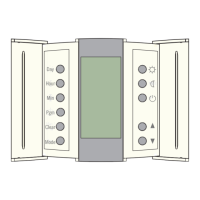
To begin, press and hold the "Clear" button for three seconds to display the current control mode (ctl). Use the up and down arrows to select between Ambient/Floor sensor mode (AF), Ambient temperature mode (A), or Floor sensor mode (F). The "Mode" button saves changes. If AF mode is chosen, the thermostat controls ambient temperature while keeping floor temperature within desired limits.
Briefly press the "Clear" button to display the minimum limit (FL:LO). Use the up and down arrows to set the minimum temperature. Repeat this process for the maximum limit (FL:HI). The "Mode" button saves changes.
Press and hold the "Pgm" button for three seconds to display the current temperature unit. Use the up and down arrows to toggle between °C / °F. Briefly press "Pgm" to display the current time format, then use the arrows to toggle between 24H/12H. Briefly press "Pgm" again to display the Early start setting (ES), then use the arrows to toggle between off and on. The "Mode" button saves changes.
This function is available only in automatic mode. When enabled, the thermostat calculates the optimal time to start heating to reach the desired temperature by the set time, reassessing the start time daily based on previous day's results.
Press the "Hour" button to set the hour, then the "Min" button for minutes. Press the "Day" button to set the day. The "Mode" button exits and saves changes.
Hold the "Day" button for three seconds until "DLS" appears. Use the up and down arrows to toggle between US, EU, and OFF. Briefly press "Day" to display the year, then use the arrows to set it. Repeat for month and date. The "Mode" button exits and saves changes.
The thermostat has two preset temperatures: Comfort (at home) and Economy (asleep or away from home). These are applied to each period of the weekly heating schedule. To set these temperatures, use the up and down arrows, then press and hold the Comfort or Economy button to save. Default settings are 21°C (70°F) for Comfort and 16.5°C (62°F) for Economy in A/AF modes, and 26°C (82°F) for Comfort and 20°C (68°F) for Economy in F mode.
The 5265 includes four heating periods per day (two on, two off), programmable independently with two or four periods. To use the preset schedule, switch the 5265 on and press the "Mode" button until the schedule symbol is displayed.
For maximum comfort and efficiency, four heating periods per day are recommended. To program a schedule for one day, press "Pgm" to display Monday (Mo) Period 1 (Wake). This automatically sets the temperature to your Comfort setting. If the same setting is desired for each day, press and hold the "Day" button for three seconds. Set desired 'On' time using "Hour" and "Min" buttons. Press "Pgm" to move to Period 2 (out), which automatically sets to Economy. Set desired Economy start time. Repeat for Period 3 (home) and Period 4 (sleep). After setting all four periods for Monday, press "Day" to move to the next day and repeat the process.
In Manual mode, the programmed schedule is not used. This mode allows manual temperature setting or maintaining a constant temperature. Switch between Manual mode and Schedule Mode by pressing the "Mode" button. Press "Mode" to display Manual mode. Set the temperature using the up and down arrows or select preset temperatures by pressing the Comfort or Economy button.
The heating schedule can be temporarily overridden by pressing the up and down arrows to adjust the temperature. The temperature display will flash until the next scheduled heating period, then resume the regular schedule. To cancel, press the "Mode" button.
The thermostat normally displays the actual (measured) temperature. To view the setpoint, press an up or down arrow once; it will appear for five seconds. To change the setpoint, press the up or down arrows until the desired temperature is displayed. To scroll faster, press and hold the button.
To select all seven days for a program, hold the "Day" button for three seconds. This is useful for identical daily programs. When all seven days are selected, the start time of the displayed period applies to all seven days. Tapping the "Mode" icon switches on the backlight. If no button is pressed for sixty seconds, the thermostat saves changes and returns to normal display.
All wiring must conform to IEE 17th Edition and Part P Regulations. The 5265 is IP21 rated, making it suitable for safe installation in bathrooms. All bathroom electrical circuits must be protected by a 30mA RCD. It is crucial not to ignore IP21 regulations, install the thermostat in a wet zone, or turn on underfloor heating until all adhesives are fully cured. Maximum load is 16A. Keep the sensor and thermostat away from hot or cold external influences like pipes. All electrical work must comply with IEE 17th Edition Part P Regulations. Check floor manufacturer guidelines for maximum temperature recommendations. Program the 5265 with care, as inefficient settings can lead to increased costs and wasted energy. Ensure the "Mode" button is pressed to save settings, otherwise, they may be lost. Set up the heating schedule to fit your lifestyle for the best results.
 General
| Product Type | Thermostat |
|---|---|
| Model Number | 5265 |
| Stages | 1 Heat/1 Cool |
| Hold Feature | Yes |
| Filter Change Alert | Yes |
| Programmability | Programmable |
| Power Source | Battery |
| Display Type | Digital |

 To Next Page