© Adolf Thies GmbH & Co. KG · Hauptstraße 76 · 37083 Göttingen · Germany 021690/10/20/short
Phone +49 551 79001-0 · Fax +49 551 79001-65 · info@thiesclima.com ·www.thiesclima.com Page 6 of 16
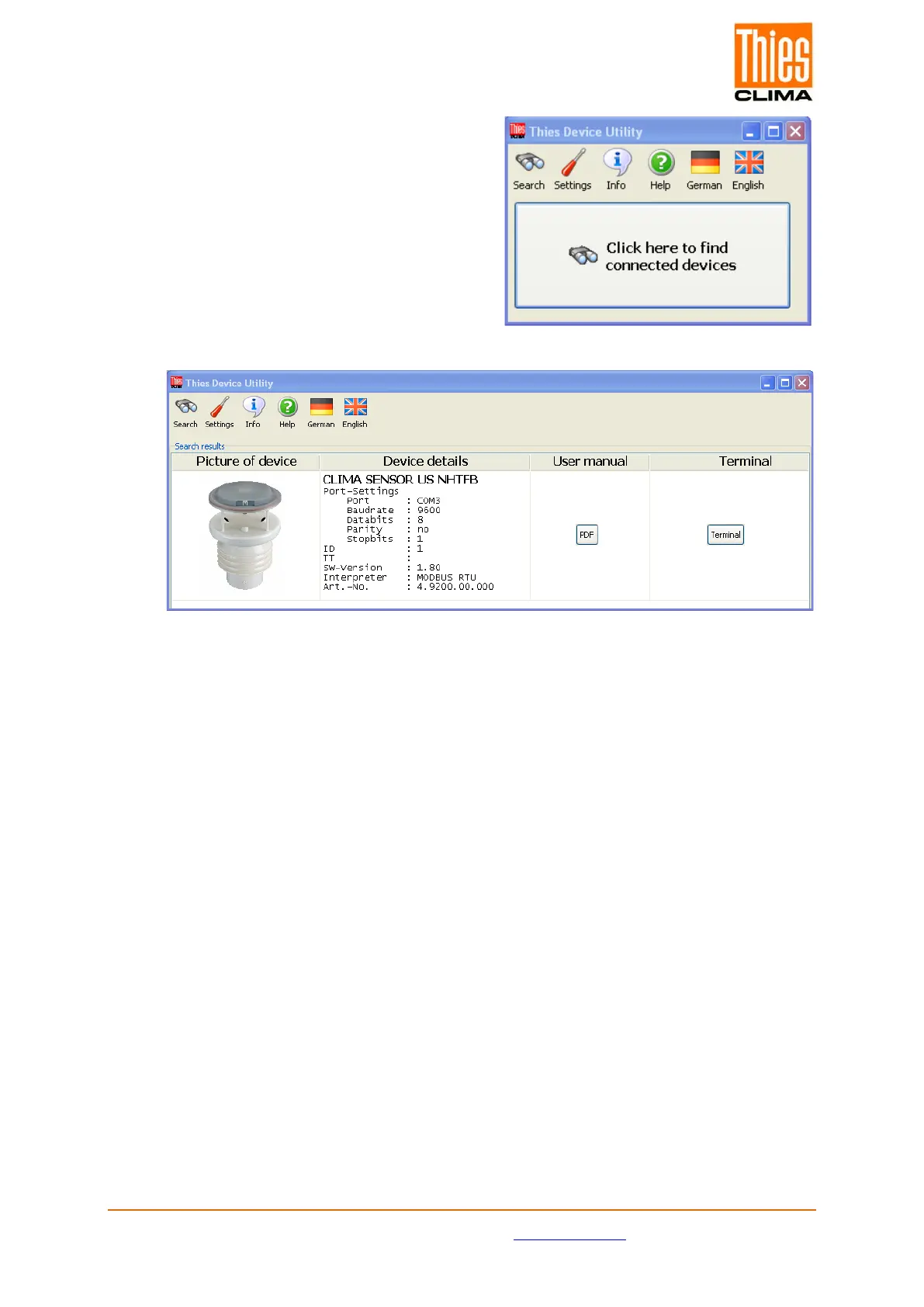
10. After the program start select the button
“Search”.
11. The program searches for connected
instruments, and displays the search result
and detail parameter.
12. By pressing the button “Terminal” a window is opened, where individual commands
can be sent, and parameters can be changed. See also the online help of the
program “Thies Device Utility.exe”. The program supports both the “Thies”- and the
MODBUS-command interpreter. Depending on the identified device the command
interpreter is selected automatically.
13. By operating the switch “PDF” the instructions for use of the instrument are opened in
the current line.
14. For information on mounting, installation, and other technical details please refer to
the instructions for use.


 To Next Page