EN
1. Product Descriptions
1
2
4
7
6
3
5
8
9
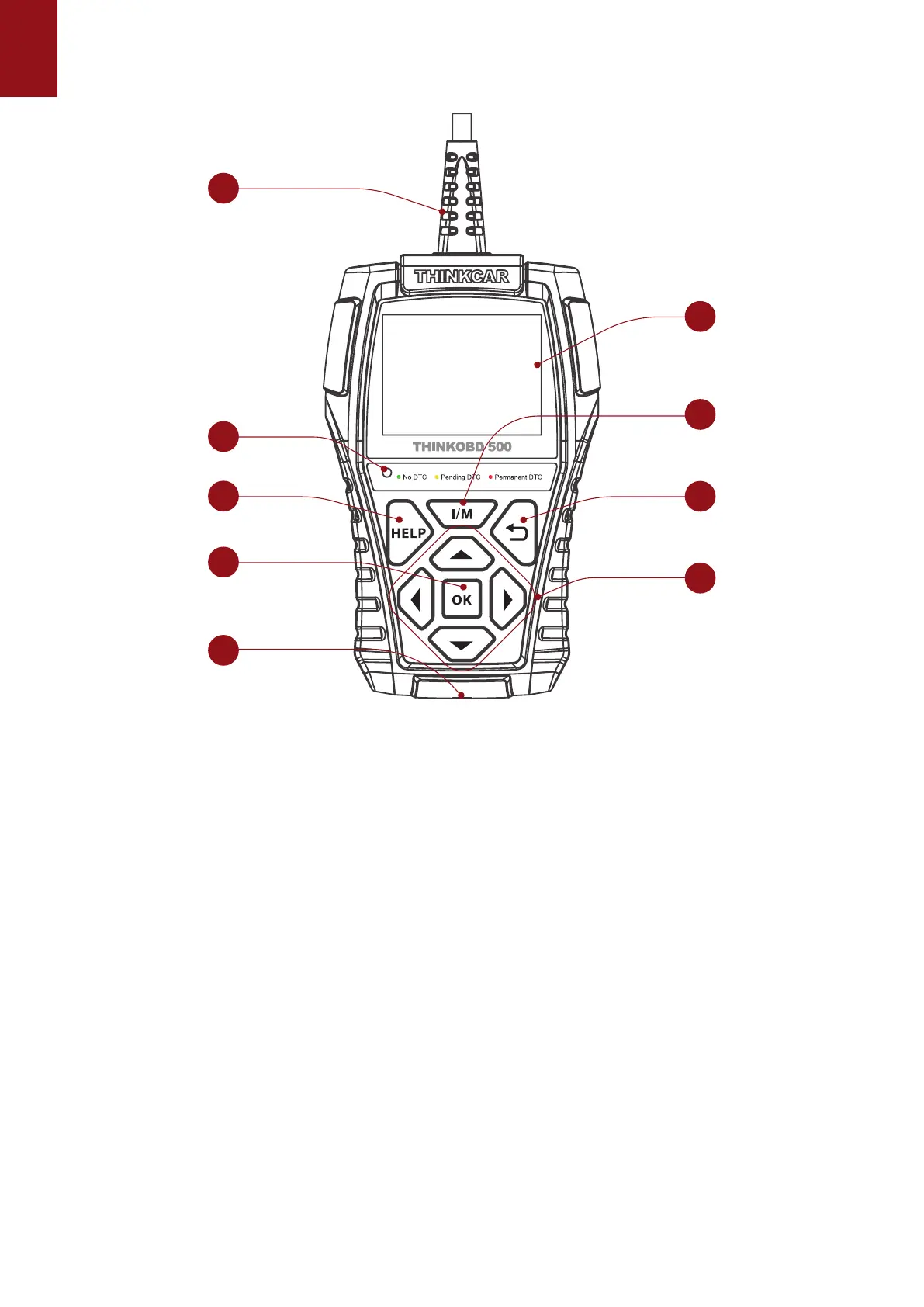
(1) Diagnostic Cable: Standard OBDII diagnostic cable
(2) LCD Display: 2.8 inch display (240*320)
(3) Code severity alert: Three status indicators
(4) I/M Button: Quickly enter "I/M READINESS" to view the data ow
(5) Help: About OBD instructions, about data ow instructions, about printing instructions, about
exhaust ready instructions
(6) Up, down, left and right keys: used to select interactive functions
(7) Return key: Return to upper function
(8) OK Return: Conrm button
(9) Mini usb: Used to upgrade software and print functions
Code severity alert
Code severity reminder: By reading the code, you can quickly determine whether your vehicle
needs to be repaired immediately, or whether you can wait for you to go home and repair it
yourself.
LED indicator warning: There are three LED indicators on the barcode reader: NO DTC: Your
vehicle is in good condition. Pending DTC: You need to solve the problem and clear the code.
Permanent DTC: There is a serious problem with your vehicle. If these problems cannot be
resolved, you may fail the emission test.



 To Next Page