EN
EN
5
4
Warranty
7
Life-time technical support and 12 months warranty(including electronic products for damages
caused by defects in materials or workmanship) are the most basic. Damages to the equipment or
components caused by abusing, unauthorized modification, using for non-designed purposes,
operation in a manner not specified in the instructions, etc.are not covered by this warranty. The
compensation for dashboard damage caused by the defect of this equipment is limited to repair or
replacement. THINKCAR does not bear any indirect and incidental losses.
Please contact Online Customers Service via the order interface.
Service Line: 1-909-757-1959
Customer Service Email: support@mythinkcar.com
Products tutorial, videos, FAQ and coverage list are available on THINKCAR official website.
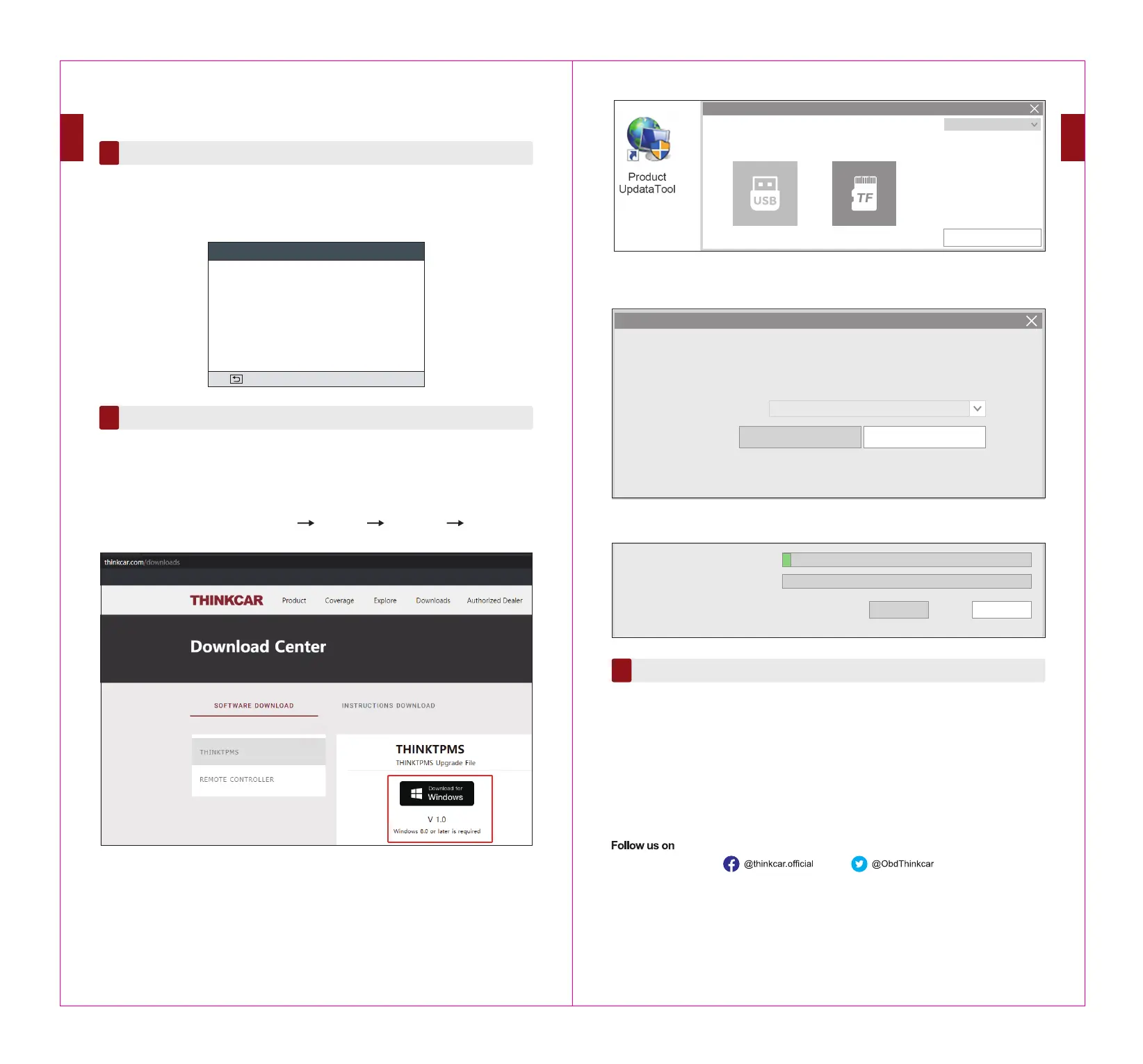
Stpe 5: Once the SD CARD connects to the computer, the software will detect the Serial Number
automatically. Click “ Device Upgrade ”.
Following the instruction and click “download” at the end.
connection mode
English
OK
Select Device(V1.07.013)
Welcome
Device Upgrade
Print Manger
974990000040(F:)
Product Serial Number
Update Tool(V1.07.013)
QuitDownload
Status
Setup Status
Tatal 50 Items
Upgrade
6
This function is for updating some firmware and new car models. You can also locate the guidance
on the tool: HELP - Software update guide.
Note: Google browser is recommended. Using other browsers may lead to unsuccessful download of the installation package.
Relearn Sensor
5
CREATE MULTI-SENSOR (1-8): This function allows users to program multiple sensors simultane-
ously. Up to 8 sensors can be programmed at the same time.
This function allows you to check and view the detailed TPMS sensor relearn procedures.
Relearn operation applies only when the newly programmed sensor IDs are different from the
original sensor IDs stored in the vehicle’s ECU. Relearn is used to write the newly programmed
sensor IDs into the vehicle’s ECU for sensor recognition.
Step 1: Download the install file on the computer.
www.thinkcar.com via Google(recommended) Downloads THINKTPMS Download for
Windows
Step 2: Install TPMS.exe(The downloaded file).
Step 3: Insert the SD CARD of the TPMS through CARD READER which you can find in the
package into the computer.
Step 4: Running the software, Selecting TF, Choosing the target language, and then click “OK”.
MERCEDES B Class 2014~2018
1/2
= Exit
Study type: Automatic/OBD
Learning steps:
Learn the new sensor ID.
1. Inflate all tires to the nominal value according to the
tire label (the label is usually located on the door
frame).



 To Next Page