Home
ThinkPad
Laptop
Edge E440
Page 109 (Chapter 8. Advanced configuration)
ThinkPad Edge E440 - Chapter 8. Advanced configuration; Installing a New Operating System; Installing Windows 7 OS
190 pages
Manual
Save Page as PDF
To Next Page
To Next Page
To Previous Page
To Previous Page
Loading...
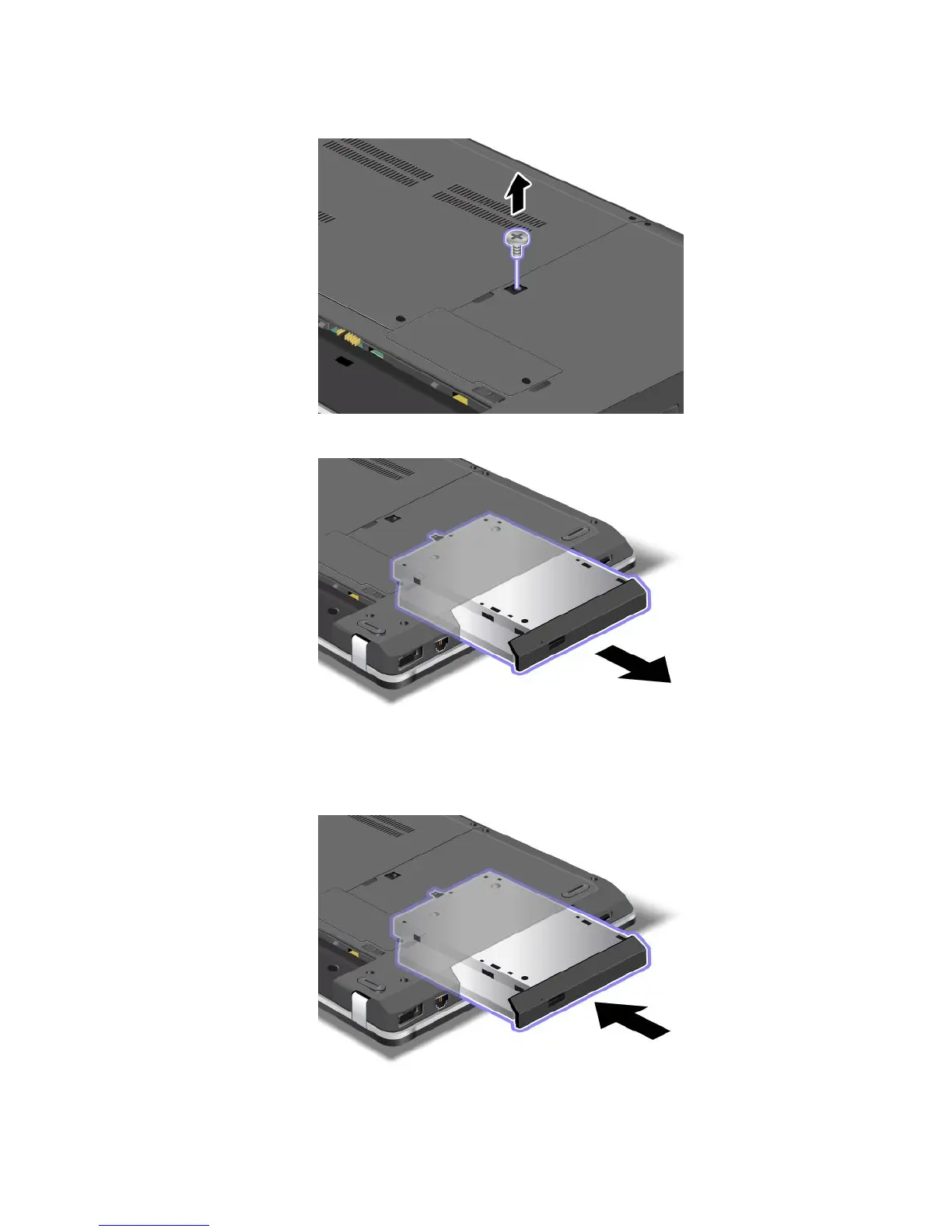
4.
Loosen
the
screw
that
secures
the
optical
drive
and
remove
it.
5.
Pull
out
the
optical
drive.
T
o
install
a
r
epaired
optical
drive
or
a
new
one,
do
the
following:
1.
Insert
the
optical
drive
int
o
the
optical
drive
bay,
and
then
pr
ess
it
firmly
into
the
connector
.
Chapter
6
.
Replacing
devices
93
108
110
Other manuals for ThinkPad Edge E440
Hardware Maintenance Manual
132 pages
Related product manuals
ThinkPad Edge E420
2 pages
ThinkPad Edge E530
118 pages
ThinkPad Edge E540
134 pages
ThinkPad E550
112 pages
ThinkPad E555
172 pages
ThinkPad E460
162 pages
ThinkPad E560
120 pages
ThinkPad E470
128 pages
ThinkPad T60
222 pages
ThinkPad P50
180 pages
ThinkPad T430
192 pages
ThinkPad T420s
152 pages



 To Next Page