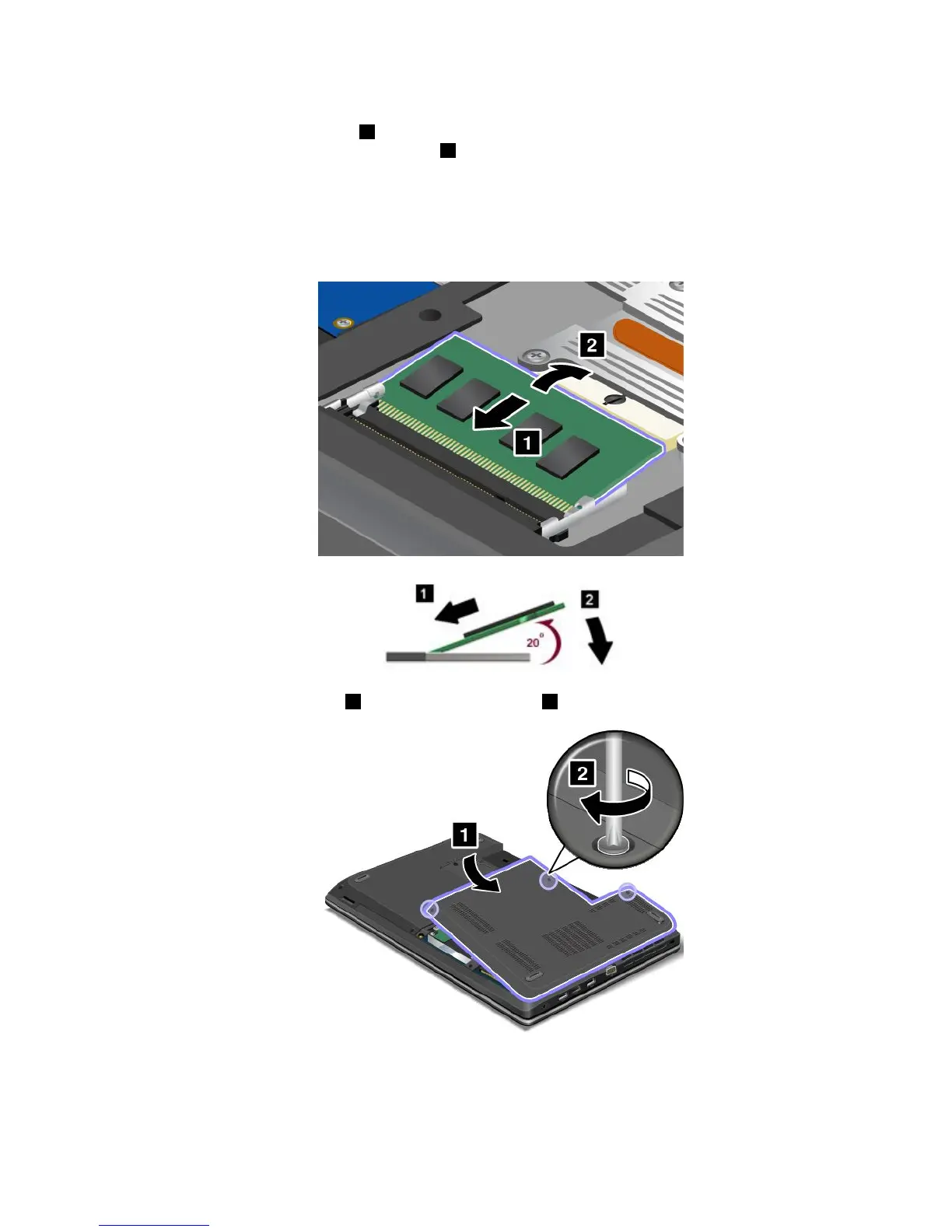
6.Placethenotchedendofthenewmemorymoduletowardthecontactedgesideofthememoryslot,
andinsertthememorymodule
1intotheslotatanangleofabout20degrees.Pivotthememory
moduledownwarduntilitsnapsintoplace2.Ensurethatthememorymoduleisfirmlyinstalledin
theslotandcannotbemovedeasily.
Attention:Donottouchthecontactedgeofthememorymodule.Otherwisethememorymodule
mightbedamaged.
Note:Ifyouinstallamemorymoduleinonlyoneofthetwomemoryslots,installitinthebottomslot.
7.Reinstallthecomputercover1.Thentightenthescrews2.
8.Reinstallthebattery.See“Replacingthebattery”onpage71.
9.Turnthecomputeroveragain.Connecttheacpoweradapterandallcables.
Chapter6.Replacingdevices101



 To Next Page