© Third Dimension Confidential Document D13-1604-OP-EN-3.3
V7.5
17
A
B
C
D
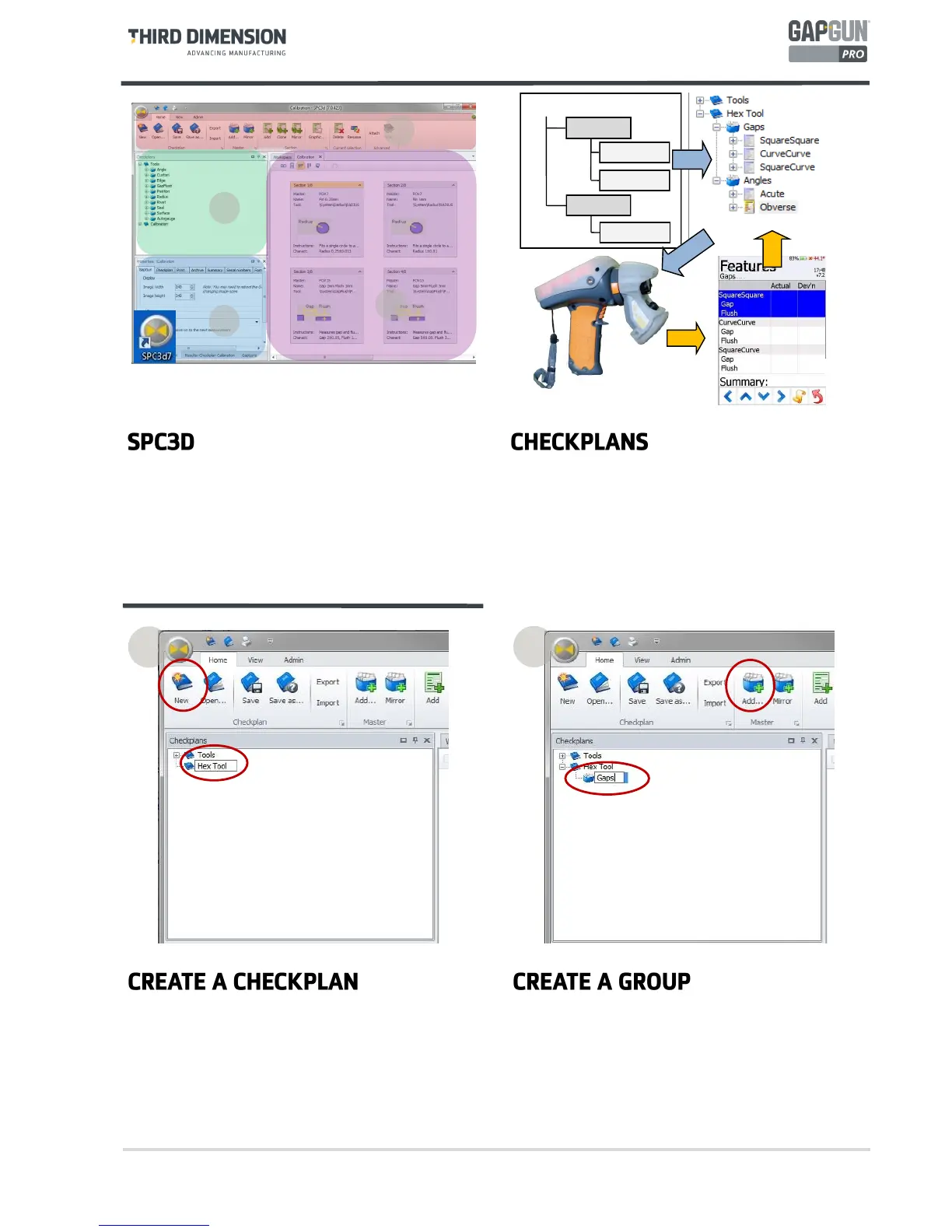
The SPC3D PC application is used to configure
Checkplans, collect measurements and configure
Features.
A. Context-sensitive command ribbon.
B. Checkplan tree view.
C. Tabbed Properties, Results and GapGuns windows.
D. Tabbed Workspace, Checkplan and Live display.
The GapGun uses a Checkplan to describe what
Features are to be measured and in what order.
Features can be put into Groups so that related
measurements can kept together.
The first step is to create a new Checkplan and give it a
descriptive name ‘Hex’.
A Checkplan can have one or more Groups, for example
grouping Features on one part of the object. A Group
can be copied to create repeating sets of Features or
mirrored to create a Group for the opposite side of the
object.
Add a Group to the Checkplan and give it a descriptive
name ‘Gaps’.
1
2
SPC3D is used to define the checkplan and configure the
features that are to be measured. These are combined
into a Works Order which is downloaded to the GapGun
to tell the operator what to measure and where to
measure each feature.
The measured results are then returned to SPC3D to be
stored and formatted for further processing.
Checkplan
Feature 1
Feature 2
Feature 3
Group 1
Group 2



 To Next Page