18
© Third Dimension Confidential Document D13-1604-OP-EN-3.3
V7.5
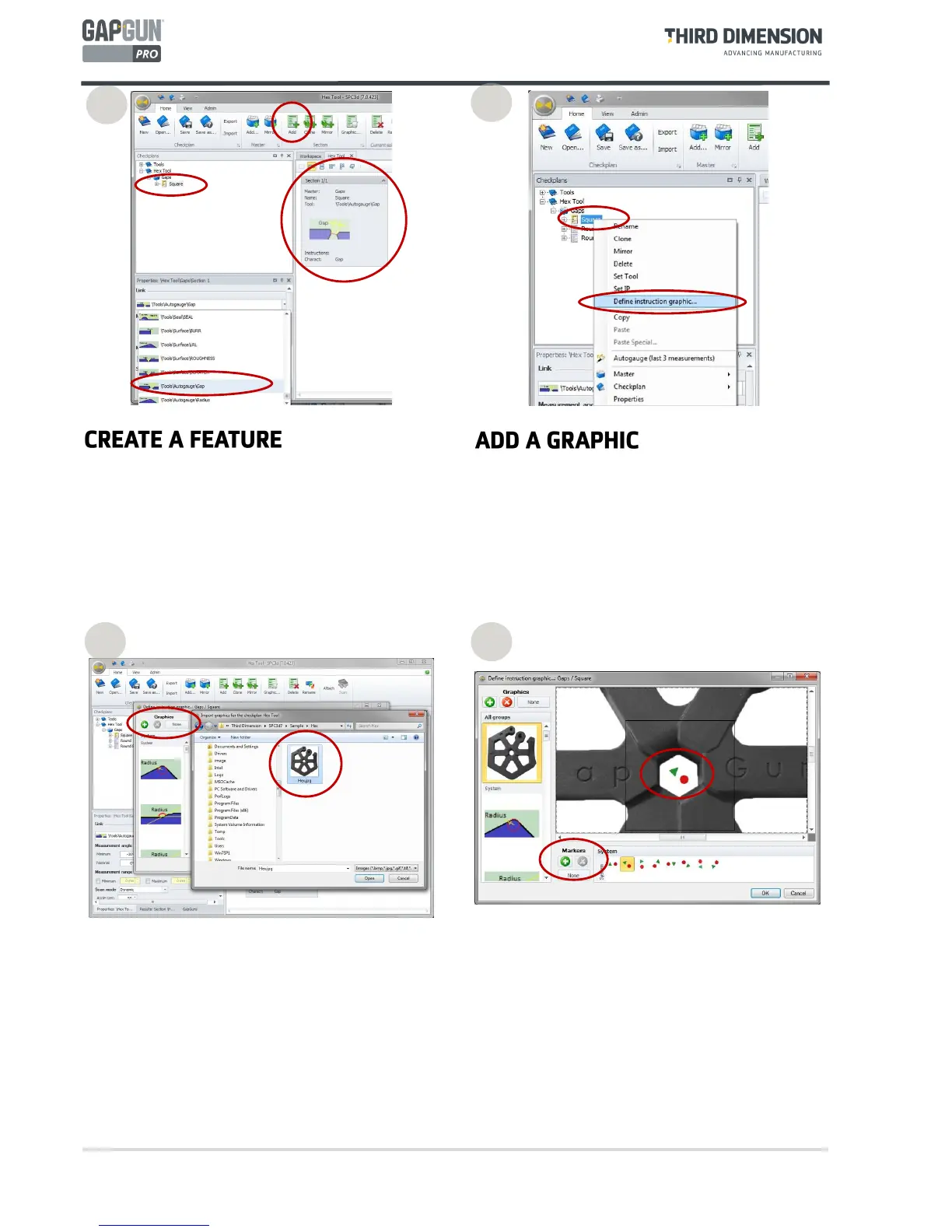
Feature describes the measurement of a feature on a
part. This can have multiple measurement values, for
example Gap and Flush.
Add three Features:
Rounded - set the link to \Tools\GapFlush\PanelRad
Square - set the link to \Tools\GapFlush\PanelGF
RndSq - set the link to \Tools\GapFlush\CRV_SQR
Markers can be added to indicate which way to aim the
GapGun. The triangle indicates the left side and the
circle indicates the right, these symbols are also etched
onto the sides of the GapGun head.
The Plus, Cross and Done buttons can be used to
manage user-defined markers.
A picture of the feature can be added so that the
operator knows the precise location of the feature and
how to orientate the GapGun.
Right-click the Feature name and click on “Define
Instruction graphic…”
Select a graphic from the left hand panel or click on
the Green Plus button to import a new picture. Delete
graphics using the Cross Button or click the ‘None’
button to remove the graphic from the Feature.
4
5 6
3



 To Next Page