© Third Dimension Confidential Document D13-1604-OP-EN-3.3
V7.5
9
3
4
To navigate on the GapGun tap on an item to select that action or pull the trigger if the item is already selected.
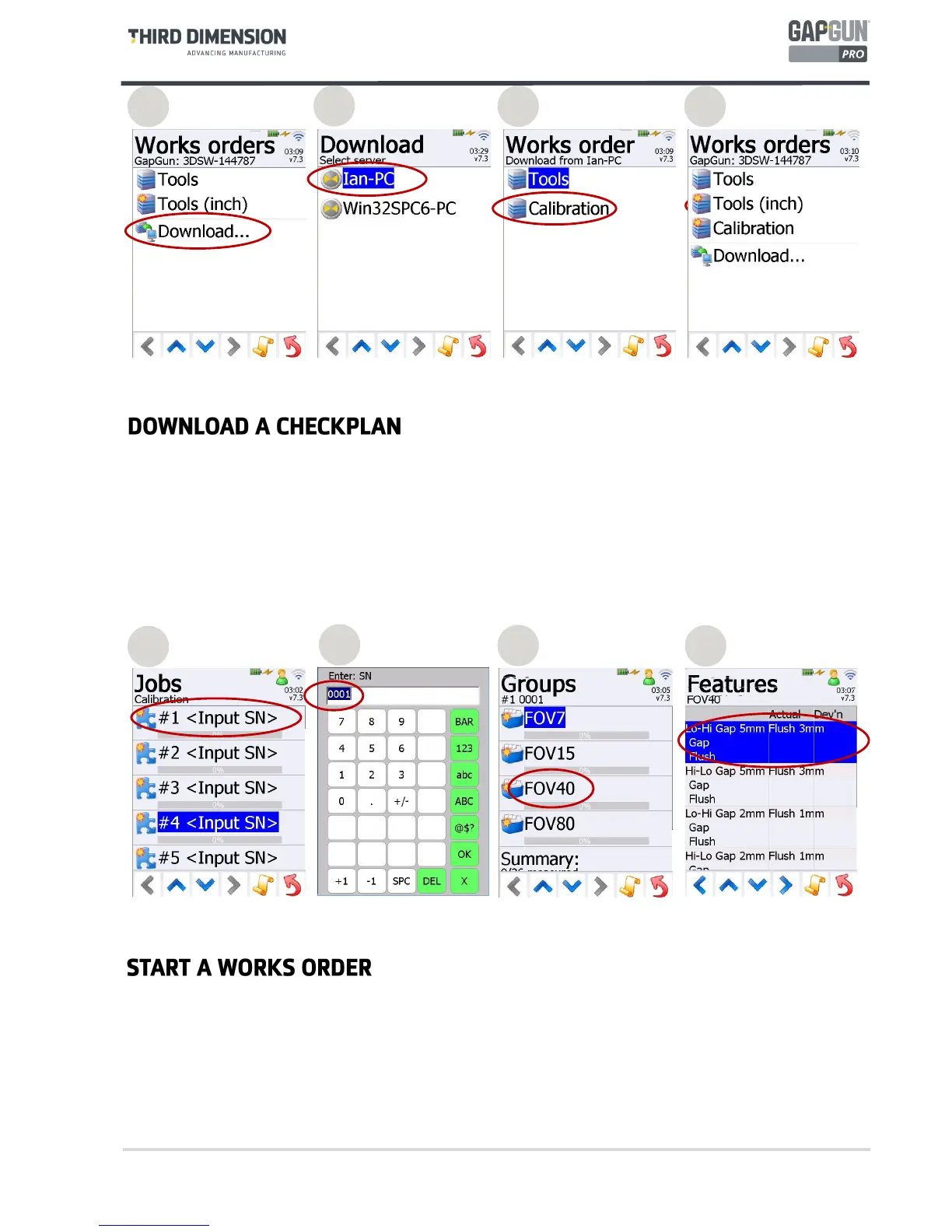
To download a Works Order based on the Calibration Checkplan:
3. Tap on the “Download…” item. Note: If the “Download…” item is not shown then there is a problem
connecting the GapGun to SPC3D.
4. Tap on the SPD3D server that is to supply the checkplan.
5. Tap on the name of the Checkplan to be downloaded. The GapGun can now be undocked and clipped into the
Clip-on battery pack.
6. Tap the name of the Checkplan to start measuring.
5
7
8
By default, a Works Order gives a list of five Jobs to perform. This allows you to make measurements on five separate
parts (or five times on the same part.) For each Job just pulling the trigger will take you through the menus in the
right sequence.
7. Pull the trigger to enter the selected Job.
8. Enter the serial number of the part to be measured in this Job.
9. This menu shows Groups of Features for each type of GapGun head. Click on the one that matches your
GapGun head type.
10. Pull the trigger to measure each Feature using the following steps.
9
10
6



 To Next Page