6
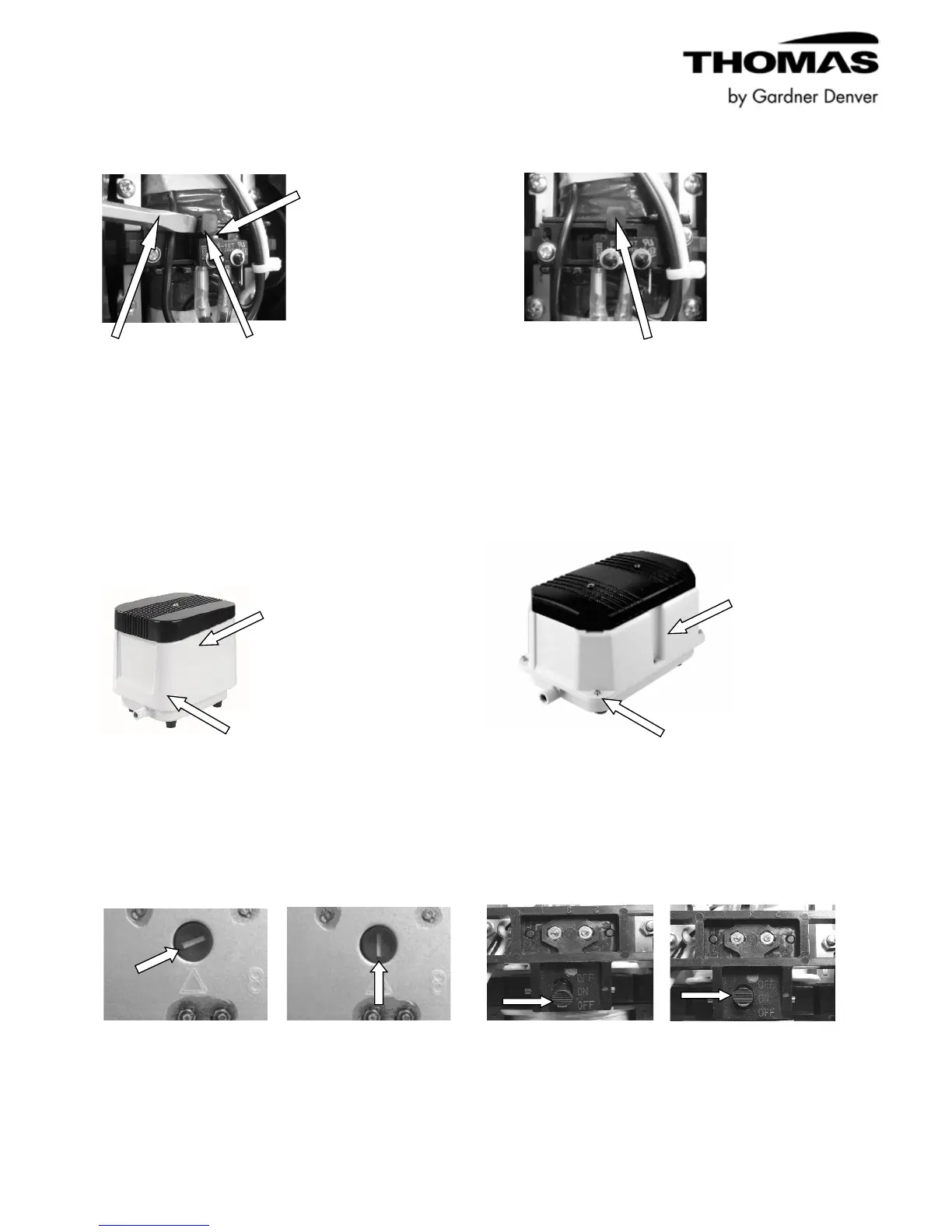
Use a common blade screwdriver to push lower After positioning diaphragm protection
portion of black switch lever over orange pin switch to proper position to deactivate
so that the orange pin is no longer exposed. switch, reassemble unit.
Applicable LP & LW Series Diaphragm Switch Deactivation Instruction:
Note: The LP & LW Series models contain different switches. Identify what type switch your pump
has by comparing the various photos and instructions below:
Disconnect power.
Remove housing screws and housing.
Applicable LP & LW Series Diaphragm Switch Deactivation Instruction (Continued):
After positioning the diaphragm protection switch After positioning diaphragm protection switch
to a vertical position with a common blade lever to “ON” position to deactivate switch,
screwdriver to deactivate switch, reassemble unit. reassemble unit.
Diaphragm protective Diaphragm protective Diaphragam protection Diaphragm protection
switch activated. switch not activated. switch acitvated. switch not activated.
(Pump will not run.) (Normal operation mode.) (Pump will not run.) (Normal operation mode.)



 To Next Page