EasyManua.ls Logo

THOMSON 14MG10F - Remote Control Functions; Basic Operation and Input Selection; Menu Navigation and Control

THOMSON 14MG10F
12 pages
Print Icon
To Next Page IconTo Next Page
To Previous Page IconTo Previous Page
Loading...
GB
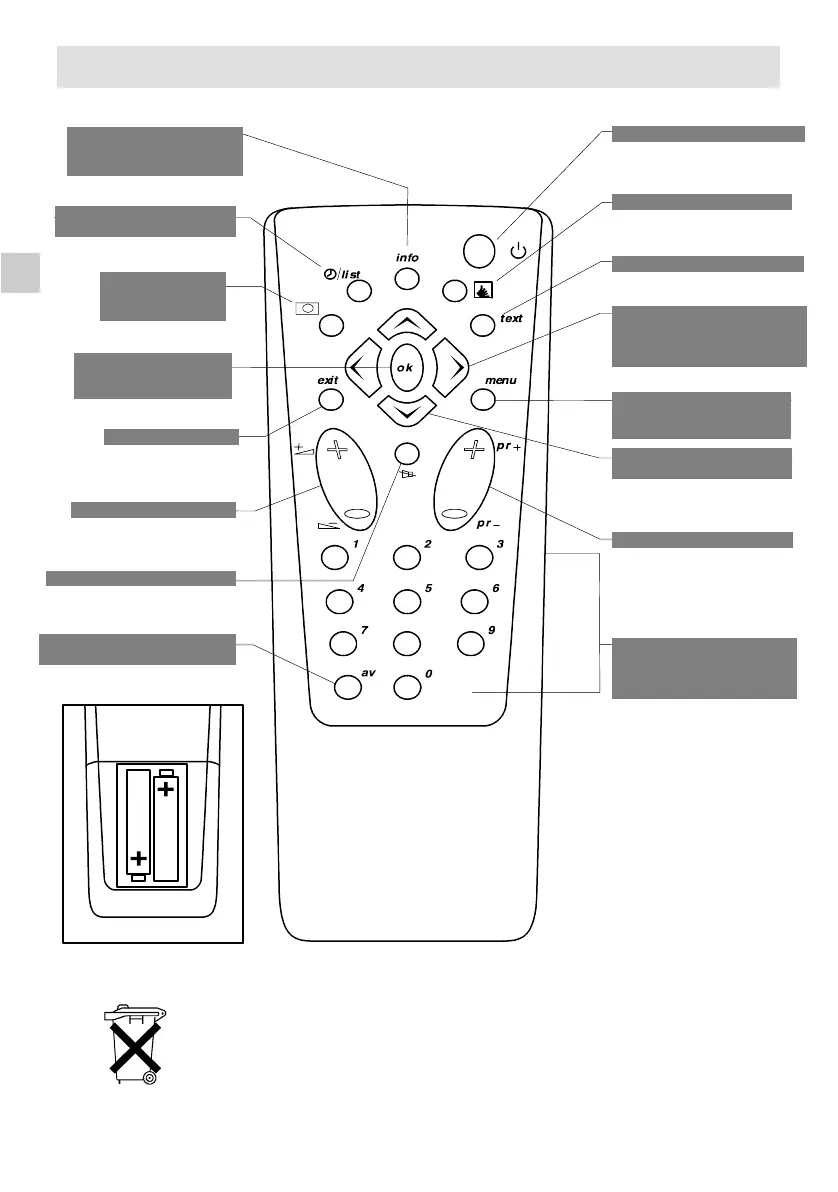
Batteries: Remove the lid at the back of the remote control and insert two 1.5
V, LR06 batteries.
8
Display programme No.
and sleep timer
(Yellow
button)
Display Timer Menu
(Green button)
Call up personal
adjustments
(Red button)
Confirmanactionor
validate a menu
option
To switch to connected
equipment
(e.g.: video recorder)
Toleaveamenu
Sound mute
Volume level
Stand-by
Inactive
Inactive
Adjustment: move to
Right/Left in menus and
select one of the proposed
options
Move Up and Down in
the menus
To go to Picture and
Channel Adjustment
menus
Direct access to
programmes and entering
numerical values in
menus
To change programme
”Please respect the environment! Before throwing any batteries away, consult
your distributor who may be able to take them back for specific recycling..”
4
Remote Control

Related product manuals