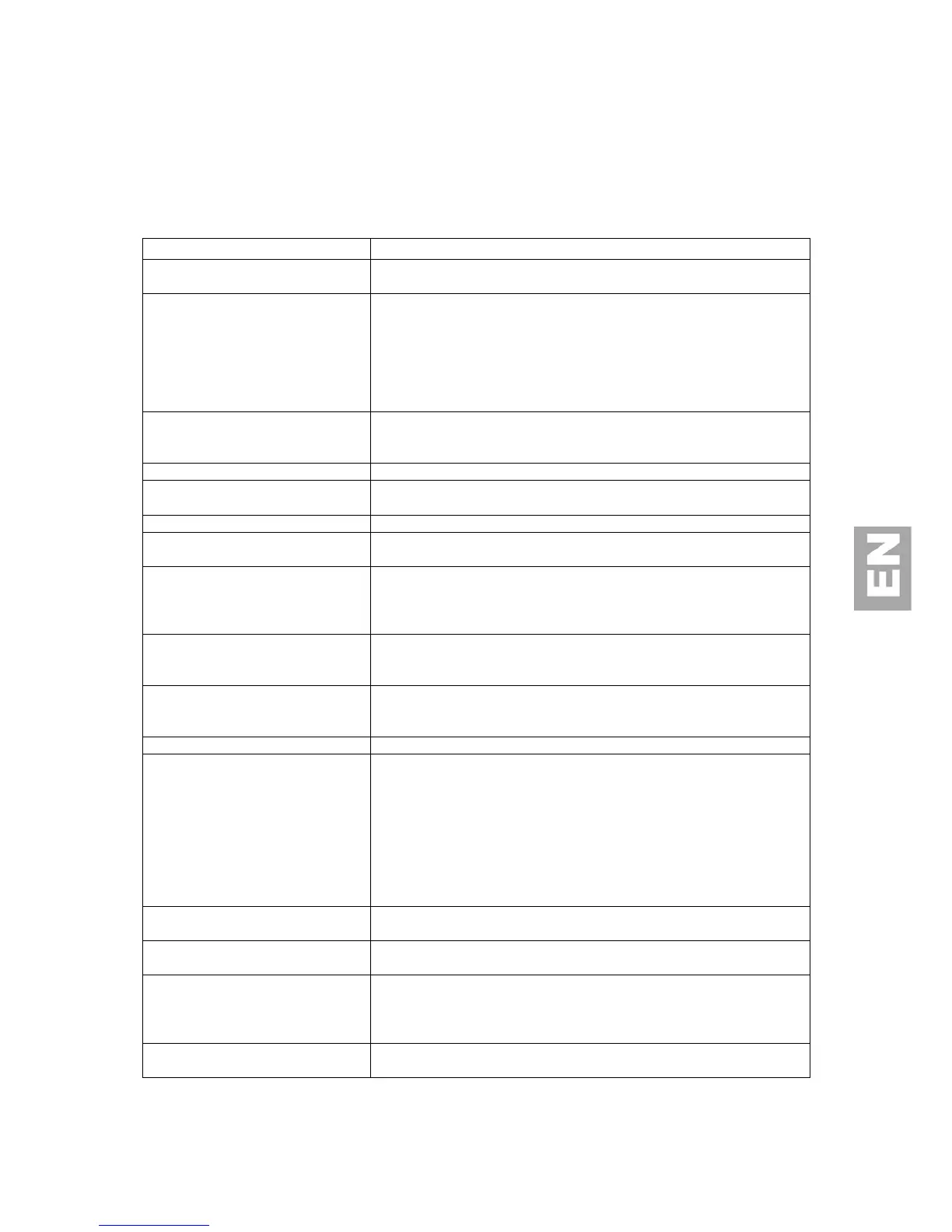
TROUBLE SHOOTING
Before you call for service, determine the symptoms and make a few simple checks as
shown below.
TV set:
l Ensure whether the power plug is securely inserted into the
receptacle.
There is no picture or sound
l Ensure the LCD TV power is ON (Indicated by the green LED on
the front of the unit)
l Reception other than those of broadcasting stations can be
considered.
l Check for connection to wrong terminal or for wrong input mode.
l Ensure the communication cable is properly connected between
the Video Source and the LCD TV.
There are spots on the screen
l Check whether your AV equipments is affected by interference
from automobiles, trains, high-voltage transmission lines, neon
signs or other potential sources of interference.
l Check whether all image adjustments have been properly adjusted.
Improper screen position or size
l Check whether screen position and size have been properly
adjusted.
The image appears distorted
l Ensure the TV's aspect ratio is properly set.
l Check the "Component" or "RGB" setting in the LCD TV and set
it for the appropriate signal type.
The image appears too bright, and
there is a loss of definition in the
brightest areas of the image.
l Check whether the contrast setting is too high.
l The DVD player is set for a high-level output.
l The video signal has not been terminated properly somewhere in
the system.
The image appears too 'washed out',
or the darkest areas of the image
appear too bright.
l Check whether Brightness is set too high.
l The DVD player may be set at too high a brightness level.
If “xxx searching” appears, the image
or signal cannot be produced by
display.
l Check the cable for disconnection.
l Check for connection to proper terminal or for proper input
mode.
l Check whether the input signal is acceptable to the display.
Remote Control does not function
properly
l Check for incorrect battery orientation.
l Check for dead batteries
l Check for distance and angle from the display.
l Check whether remote control is properly being pointed at the
display’s receiver.
l Check for any obstacle between the remote control and the
display.
l Check that the remote sensor window is not under strong
fluorescent lighting.
There is no picture or sound, just
noise.
l Make sure the antenna cable is properly connected.
l Consider whether TV signals are being properly received.
l Make sure the antenna cable is properly connected.
l Consider whether TV signals are being properly received.
l Check whether you have selected “Mute” for Audio setting.
l Make sure the volume is not set to minimum.
l Make sure that headphones are not connected.
l Check cables for disconnection.
l A Mains cut could have switched the TV LCD panel in security
mode. Press ON/OFF switch to reset the set.



 To Next Page