EasyManua.ls Logo

THOMSON 42M61NF21 - Page 17

THOMSON 42M61NF21
125 pages
Print Icon
To Next Page IconTo Next Page
To Previous Page IconTo Previous Page
Loading...
LCDM61NF21(MT02+DE200) Factory Alignment Specification
6
ǃ
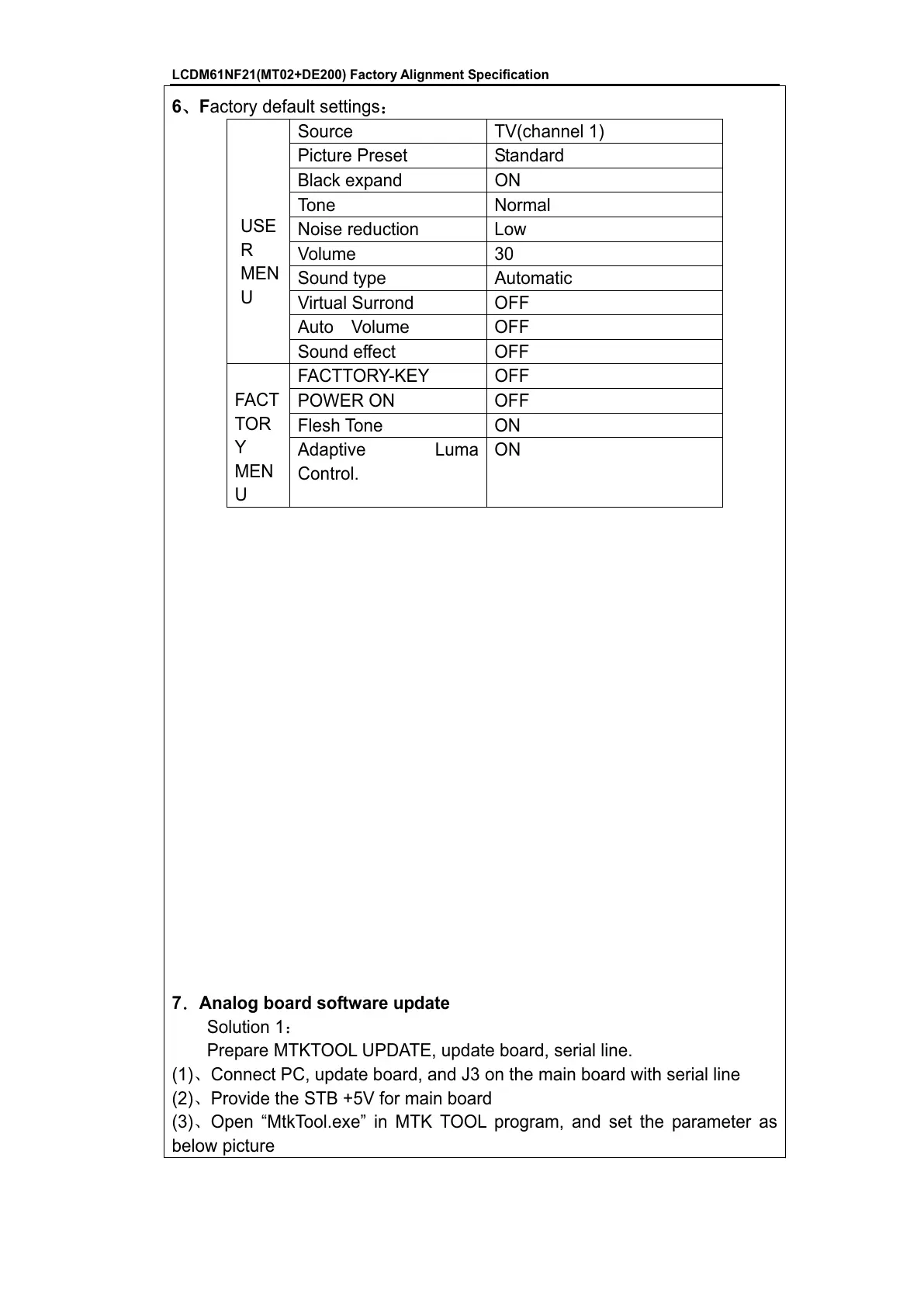
Factory default settings
˖
Source TV(channel 1)
Picture Preset Standard
Black expand ON
Tone Normal
Noise reduction Low
Volume 30
Sound type Automatic
Virtual Surrond OFF
Auto Volume OFF
USE
R
MEN
U
Sound effect OFF
FACTTORY-KEY OFF
POWER ON OFF
Flesh Tone ON
FACT
TOR
Y
MEN
U
Adaptive Luma
Control.
ON
7
ˊ
Analog board software update
Solution 1˖
Prepare MTKTOOL UPDATE, update board, serial line.
(1)ǃConnect PC, update board, and J3 on the main board with serial line
(2)ǃProvide the STB +5V for main board
(3)ǃOpen “MtkTool.exe” in MTK TOOL program, and set the parameter as
below picture

All manuals and user guides at all-guides.com

Related product manuals