Connections and Setup
3
EN
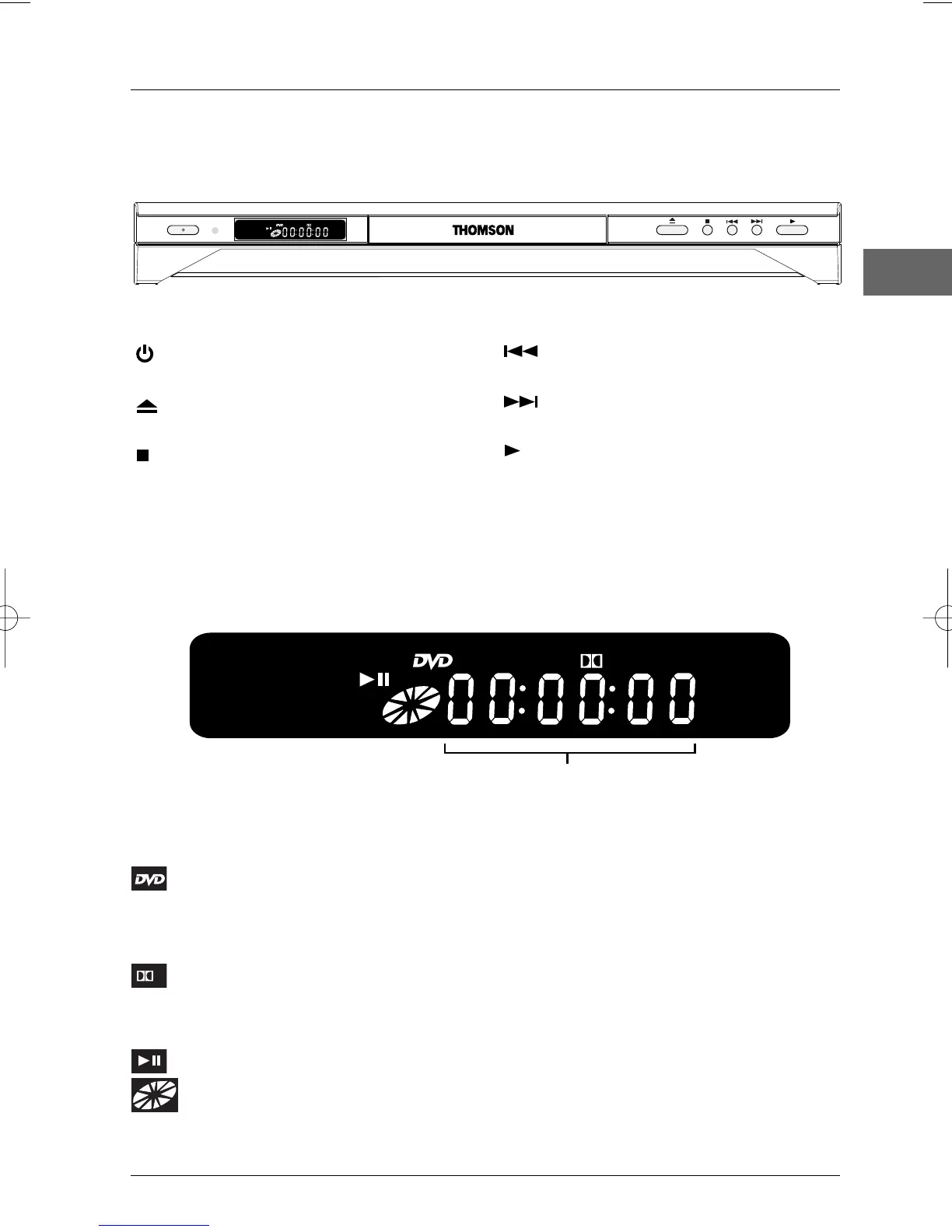
Front panel controls (buttons appear left to right below)
Front panel display
Elapsed time
SVCD Indicates the type of disc loaded: CD (audio CD),VCD (Video CD), SVCD
(Super Video CD).
Appears when a DVD is being played.
MP3 Appears when an mp3 disc is loaded.
WMA Appears when a WMA disc is loaded.
Appears when the sound is in Dolby Digital.
RGB Appears during playback to show that the RGB output is available on the Scart
socket.
Appears when a disc is being played or in pause.
Appears when a disc is loading.The speed and direction show the play mode of
the disc.
D
SVCD
MP3
WMA
D
RGB
STANDBY/ON
OPEN/CLOSE
STOPSTOP PREVPREV NEXTNEXT PLAY
SVCD
MP3
WMA
D
RGB
STANDBY/ON - Switch the appliance on
and off.
OPEN/CLOSE - Open and close the
DVD player's disc tray.
STOP - Stop disc playback.
PREV - Start a reverse search for a
chapter or a track.
NEXT - Start a fast forward search for a
chapter or a track.
PLAY - Start playing a disc.
DTH213_EN 22/12/03 16:44 Page 3


 To Next Page