3
GB
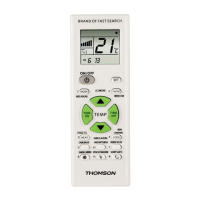
7.2 Timing ON and OFF function
The remote control takes over the timer
function of the original remote control. After
pressing “TIME ON” or “TIME OFF” button,
the timing indicator of the air conditioner will
be lighted up, indicating that it has entered
timing status.
7.3 Child-lock function setting
Locking: press “Set” button and “Manual
Wind
”button synchronously and the display
scr
een will display “Child-lock” icon .
Unlocking: pr
ess “Set” button and “
Auto-
matic Wind
”button synchronously and the
“Child-lock” icon
on the display screen will
disappear
.
7.4 Clock function setting
•Keep pressing the “Set” button and “Mode”
button synchronously.When the correspond-
ing digit begings to icker,itmeans it has
entered clock setting.
•Press “TEMP ▲”(or “Temp ▼”) button
for 1hour increasing (decreasing). Youcan
keep pressing for 2seconds for continuous
increase or decrease.
•Press “Set” button for hour-setting completion.
•Atthis point, the digit the minute corresponds
to begin to icker.You may use “Temp ▲”(or
“Temp ▼”) button for minute setting.
•After minute setting, press “Set” button to
exit the clock setting.
8. Maintenance
•Donot mix new and used batteries for
powering the remote control, as old batteries
tend to leak and may cause power drain.
•Donot use corrosive or abrasive cleansers on
your remote control.
•Keep the remote control dust free by wiping
it with asoft, dry cloth.
9. Warranty Disclaimer
The manufacturer assumes no liability and pro-
vides no warranty for damage resulting from
improper installation/mounting, improper use
of the product or from failuretoobserve the
operating instructions and/or safety notes.
10. Service and Support
Please contact Hama Product Consulting if you
have any questions about this product.
Hotline: +49 9091 502-0 (German/English)
Further support information can be found here:
www.hama.com
11. Recycling Information
Note on environmental
protection:
After the implementation of the
European Directive 2012/19/EU and
2006/66/EU in the national legal system, the
following applies: Electric and electronic
devices as well as batteries must not be
disposed of with household waste. Consumers
areobliged by law to return electrical and
electronic devices as well as batteries at the
end of their service lives to the public collecting
points set up for this purpose or point of sale.
Details to this aredened by the national law
of the respective country.This symbol on the
product, the instruction manual or the package
indicates that aproduct is subject to these
regulations. By recycling, reusing the materials
or other forms of utilising old devices/Batteries,
you aremaking an important contribution to
protecting our environment.


 To Next Page