Common
interface
HDMI 1
HDMI 3 HDMI 2
Pb/Cb
Component input (CMP)
audio
VGA
VGA
audio in
Service only
antenna/cable
input
Y
Pr/Cr
R
L
SPDIF out
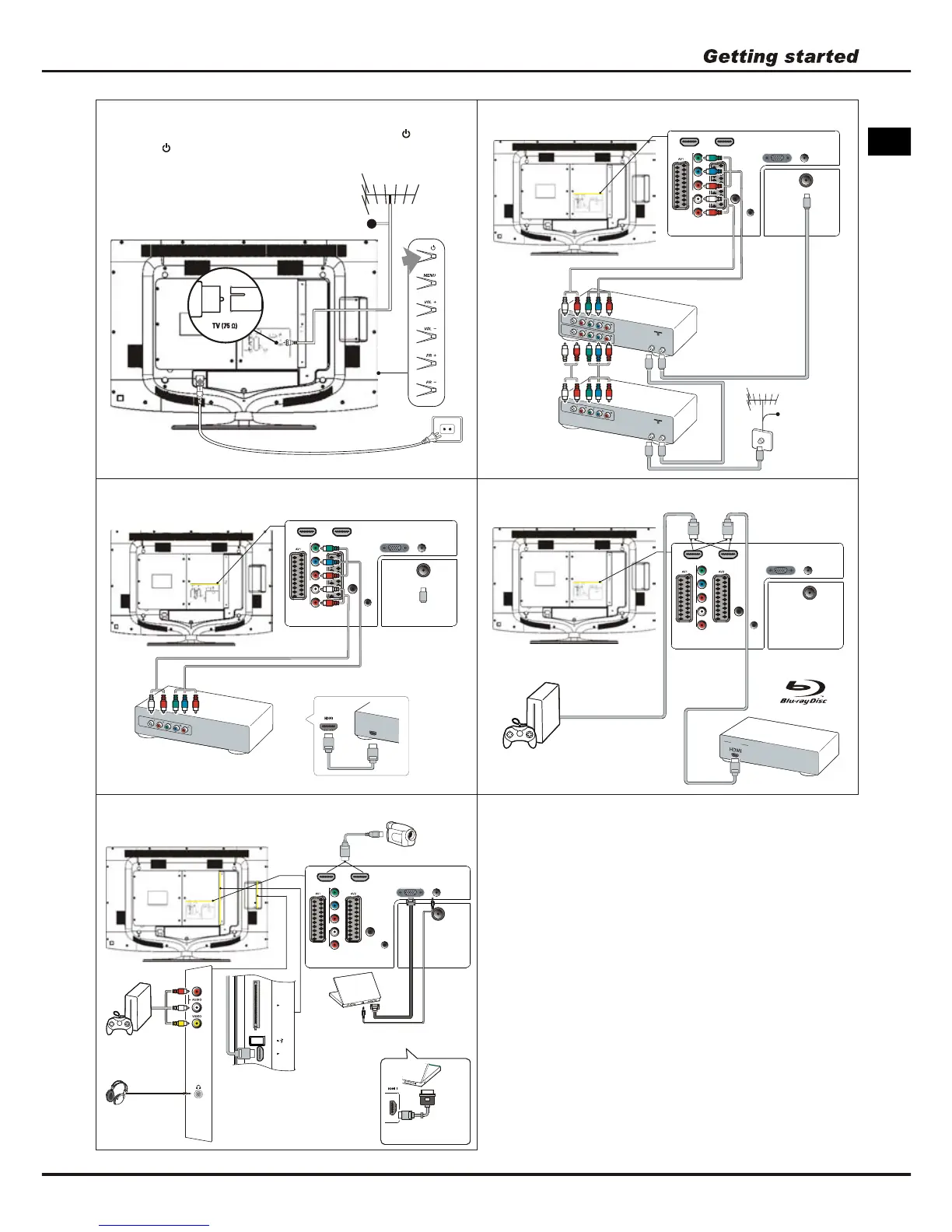
HD camcorder, headphones, game
console, camcorder, PC
TV
HD Camcorder
Note:
Before connecting a PC, set the
PC monitor refresh
rate to 60Hz.
PC
Or use an HDMI
connection.
Note: USB connector is for data
input from USB storage devices.
Game console
Headphones
Note: Excessive sound pressure
from earphones and headphones
can cause hearing loss.
2
Notes:
- The figures are for representation only.
- Not all connections available on all models.
- The location of the power socket on the TV may
vary according to TV model.
- The positions and names of the function buttons
and connectors on the TV may vary according to
TV model.
HDMI 3 HDMI 2
Pb/Cb
Component input (CMP)
audio
VGA
VGA
audio in
Service only
antenna/cable
input
Y
Pr/Cr
R
L
SPDIF out
Blu-ray Disc player, HD game console
TV
O
U
T
HD game console
Blu-ray Disc player
Note: Number of
HDMI may vary.
Cable
Connect the power and antenna
To switch on TV after connecting power cord, press or
POWER/ .
Note: Position of power socket varies according to TV model.
HDMI 3 HDMI 2
Pb/Cb
Component input (CMP)
audio
VGA
VGA
audio in
Service only
antenna/cable
input
Y
Pr/Cr
R
L
SPDIF out
DVD recorder, cable receiver
O
U
T
I
N
A
N
T
E
N
N
A
O
U
T
TV
DVD
recorder
Set-top
box
Cable
Note: Disconnect the
power cord before
connecting devices.
O
U
T
I
N
A
N
T
E
N
N
A
IN
O
U
T
HDMI 3 HDMI 2
Pb/Cb
Component input (CMP)
audio
VGA
VGA
audio in
Service only
antenna/cable
input
Y
Pr/Cr
R
L
SPDIF out
TV
DVD player, home theatre system
DVD player/
Home theatre system
Or use a HDMI connection.
OUT
H
D
M
I
O
U
T
EN






 To Next Page