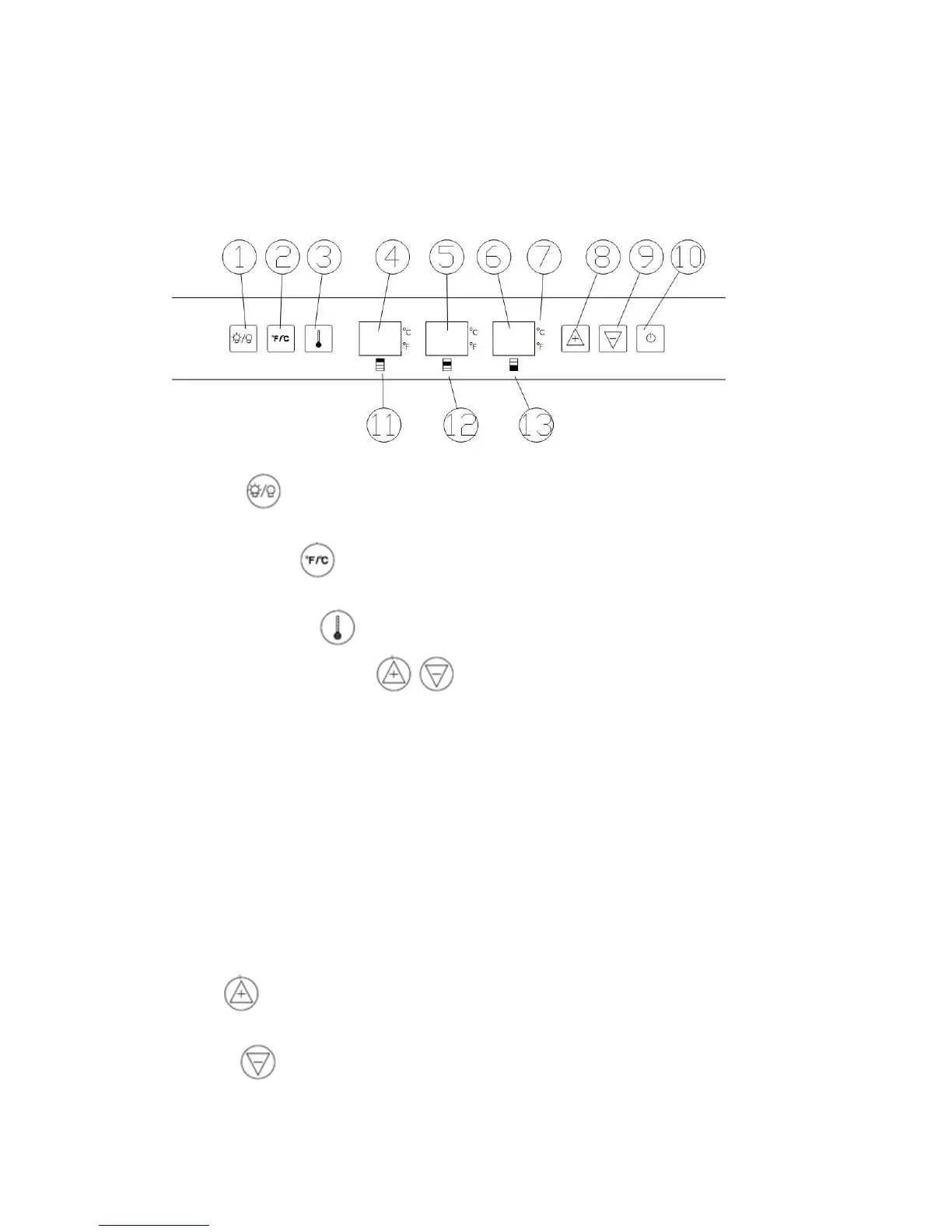
Temperature Setting
① Light
To control the inner light turn on/off.
② ℉/℃ Selector
Select the temperature display setting in Fahrenheit or Celsius degree.
③ Set temperature
Press this button, press to set temperature, the number of temperature
will flash once you press the button. You could only set the temperature when the
number “flash”.
④ Temperature Display for upper chamber.;
The LED display will show the setting temperature when “flash”; Display will show the
actual temperature for the upper chamber when normal.
⑤ Temperature Display for lower chamber.
The LED display will show the setting temperature when “flash”; Display will show the
actual temperature for the lower chamber when normal.
⑥ Temperature Display for drawer refrigerators.
The LED display will show the setting temperature when “flash”; Display will show the
actual temperature for the drawer refrigerators when normal.
⑦ ℃/℉ Display
⑧ Up
Used to raise (warm)the set temperature by 1℃ or 1℉ when “flash”..
⑨ Down
Used to lower (cool) the set temperature by 1℃ or 1℉ when “flash”.


 To Next Page