Temperature Setting
The setting should be operate in the control panel.
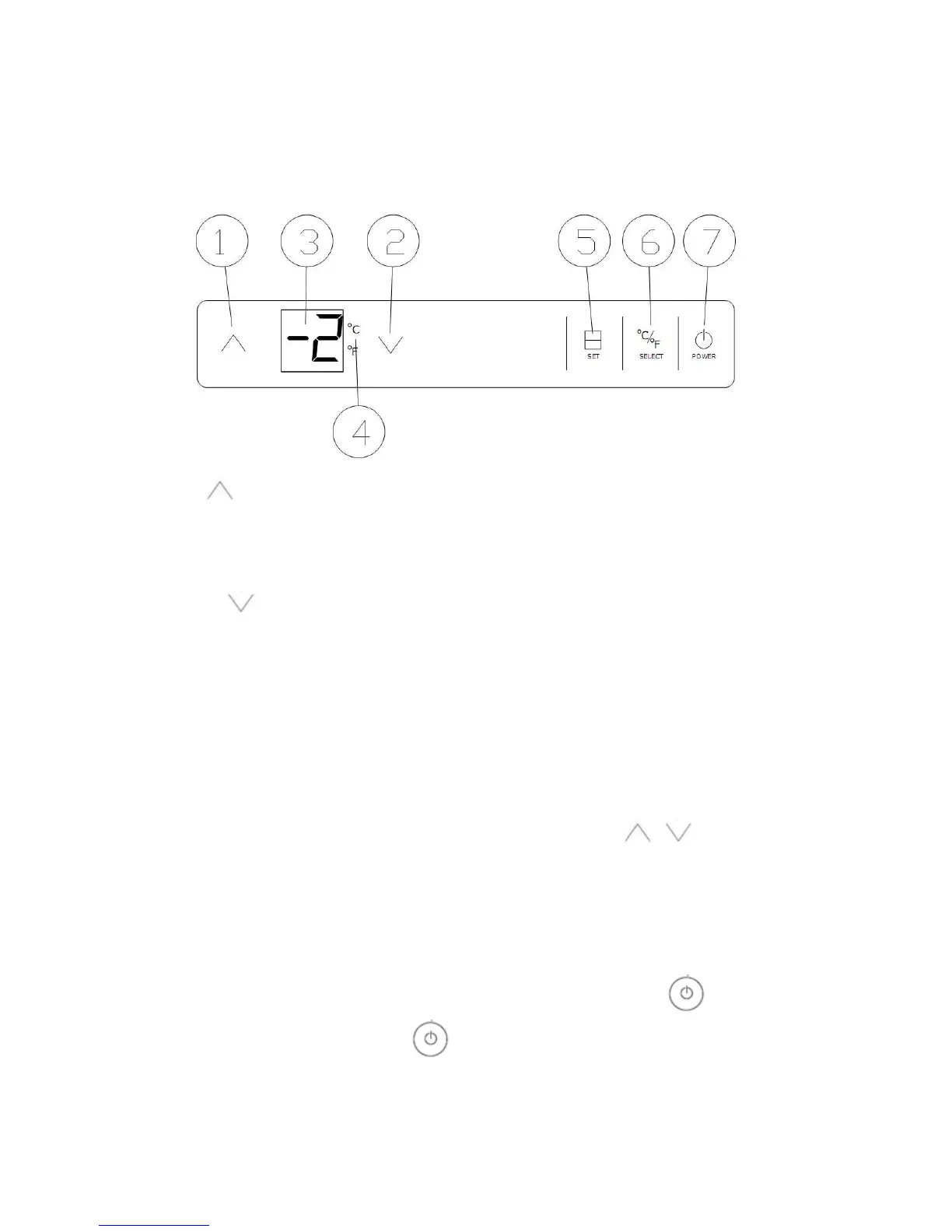
(1)Functions of each keys in the control panel.
①Up
Used to raise (warm)the set temperature by 1℃ or 1℉. When number “3” is flashing, press
it once, the temperature setting is up by 1℃ or 1℉, the highest setting temperature is
10℃(50F).
②Down
Used to lower (cool) the set temperature by 1℃ or 1℉. When number “3” is flashing, press
it once, the temperature setting is down by 1℃ or 1℉, the highest setting temperature is
-2℃(28F).
③Temperature Display for lower chamber.
The LED display will show the setting temperature when “flash”; Display will show the
temperature for the actual temperature of the cabinet when normal.
④℃ /℉ Display
⑤Setting temperature
Press this button, the number in the window will flash, then press to set
temperature. Stop to press any button for 5 seconds, then the number stop flashing to
show the actual temperature of the cabinet.
⑥℉ /℃ Selector
Select the temperature display setting in Fahrenheit or Celsius degree.
⑦Power
To control the appliance turn on/off. To turn off the appliance, touch the mark and
hold for at least 5 seconds. Press again, turn on the appliance. The LED readout
will show the original temperature set previously when restart the appliance or reconnect
after power cuts .



 To Next Page