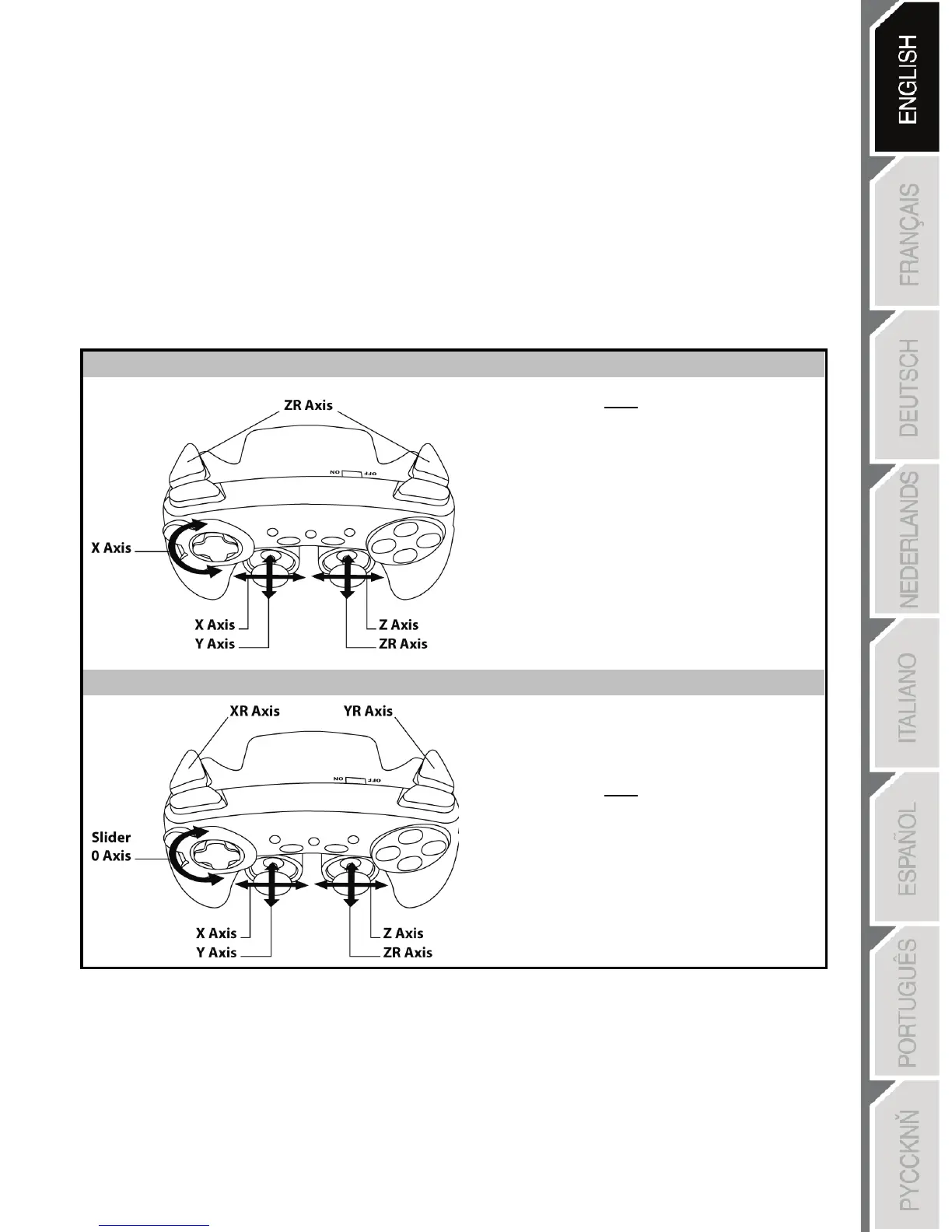
SELECTING “AXES” ON PC
• Selecting axes via “Software”:
After installing the “Advanced Programming Software”, go to page 1 of the Control Panel, click the
number of axes you wish to use and then click OK.
• Selecting axes via “Hardware”:
Press the HOME button (6) to select the number of active axes.
2 “AXES” MODES AVAILABLE ON PC
“AUTOMATIC PRESET” CONFIGURATION - PC
Here:
• “Optical wheel” associated with
“Left/Right” direction on left
mini-stick
• “Right trigger” associated with
“Up” direction on right mini-
stick
• “Left trigger” associated with
“Down” direction on right mini-
stick
Here:
• “Optical wheel” is now independent
• “Right trigger” is now independent
• “Left trigger” is now independent
To find out all of the possibilities offered on PC,
try them out in the Windows “Game Controllers” section
(once you have installed the “Advanced Programming Software”)











 To Next Page