2/12
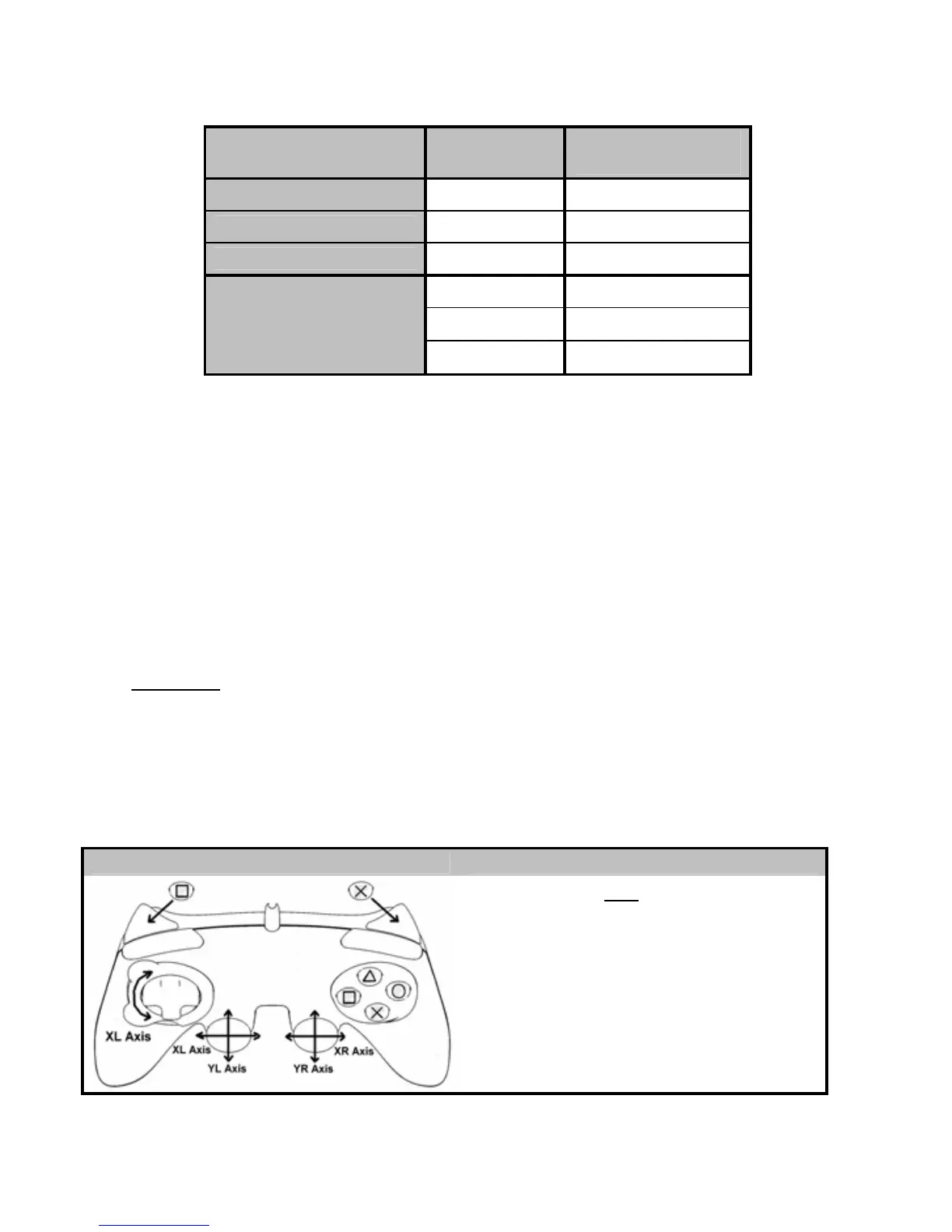
TABLE OF SUPPORTED MODES
System MODE
Color of MODE
button (8)
PLAYSTATION® 1
“PS1” OFF
PLAYSTATION® 2 “PS2” GREEN
PLAYSTATION® 3 “PS3” OFF
“4 AXES” OFF
“5 AXES” RED
PC
“7 AXES” GREEN
PLAYSTATION® 2
INSTALLATION ON PLAYSTATION® 2
1. Connect the PS2 game port connector (11) to a game port on your console.
2. Turn on your console and launch the game.
You are now ready to play!
ATTENTION
: NEVER CONNECT THE USB CONNECTOR (12) TO YOUR PLAYSTATION® 2
(to avoid the risk of damaging your gamepad and/or your console)
“PLAYSTATION® 2” MODE
• “PS1” mode: the MODE button is Off (exclusively reserved for “PlayStation® 1” games)
• “PS2” mode: the MODE button is Green (exclusively reserved for “PlayStation® 2” games)
“AUTOMATIC PRESET” CONFIGURATION - PLAYSTATION® 2
“PS2” mode MODE button is GREEN
Here
:
• “Optical wheel” associated with
“Left/Right” direction on left mini-stick
• “Right” trigger associated with
progressive “X” button
• “Left” trigger associated with
progressive “Square” button









 To Next Page