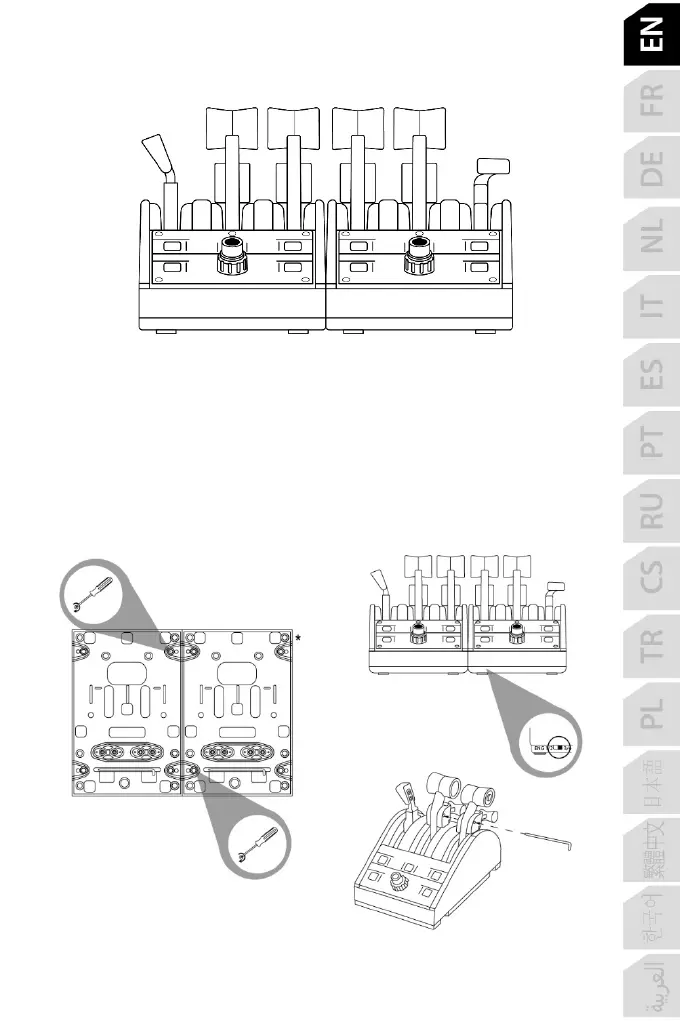
CONNECTING TWO TCA QUADRANT BOEING EDITION
THROTTLE QUADRANTS
You can connect a second TCA Quadrant Boeing Edition throttle quadrant (sold separately):
this will allow you to use 6 axes in total, simulating a four-engine commercial airliner or a
twin-engine light aircraft, for example.
1. Turn both throttle quadrants upside down, and screw on the two attachment pieces
included with TCA Quadrant Boeing Edition to attach the two devices together.
2. On the second throttle quadrant, physically set the engine selector switch (5) to 3&4 in
order to associate engines 3 and 4 with the second throttle quadrant (in the Control Panel
on PC).
3. Connect the axes together by pair (1&2 and 3&4) to make them easier to move in unison,
using the crossbar included with each TCA Quadrant Boeing Edition.














 To Next Page