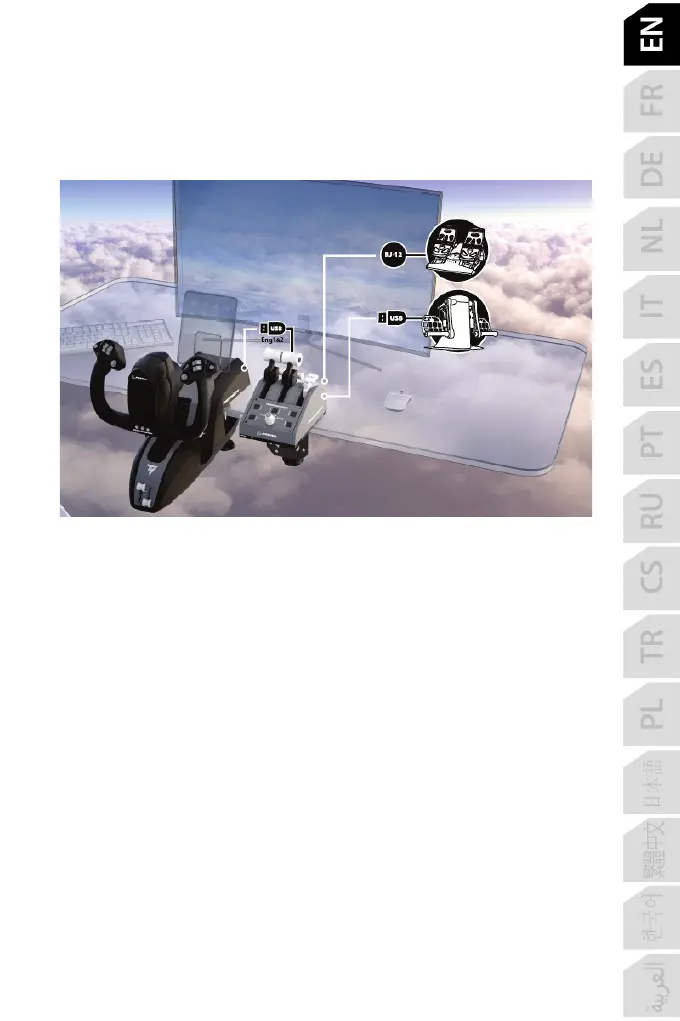
CONNECTING THE TPR* OR TFRP* RUDDER SYSTEM TO TCA
QUADRANT BOEING EDITION
* Sold separately
TCA Quadrant Boeing Edition features 6 axes, 3 of which are reserved for the Thrustmaster
TPR or TFRP rudder system (sold separately).
The TPR rudder system connects directly to TCA Quadrant Boeing Edition.
1. Connect the rudder system’s USB connector to the type A USB connector (10) located at
the back of TCA Quadrant Boeing Edition.
2. Connect the TCA Quadrant Boeing Edition USB connector to one of the USB ports on
your PC or console, or to the back of TCA Yoke Boeing Edition (sold separately).
The TFRP rudder system connects directly to TCA Quadrant Boeing Edition.
1. Connect the rudder system’s male RJ12 connector to the female RJ12 connector (12)
located at the back of TCA Quadrant Boeing Edition.
2. Connect the TCA Quadrant Boeing Edition USB connector to one of the USB ports on
your PC or console, or to the back of TCA Yoke Boeing Edition (sold separately).














 To Next Page