INSTALLATION ON PC
1. Go to https://support.thrustmaster.com
. Click Joysticks / TCA Quadrant Boeing
Edition, and then click Drivers. Download and install the PC driver and its customized
interface for the Windows Control Panel.
2. Once the PC driver has been installed, connect the type C USB connector (11) to one of the
USB ports on your PC.
3. To access the Control Panel, select Start / Apps / Thrustmaster / Control Panel (in
Windows 10).
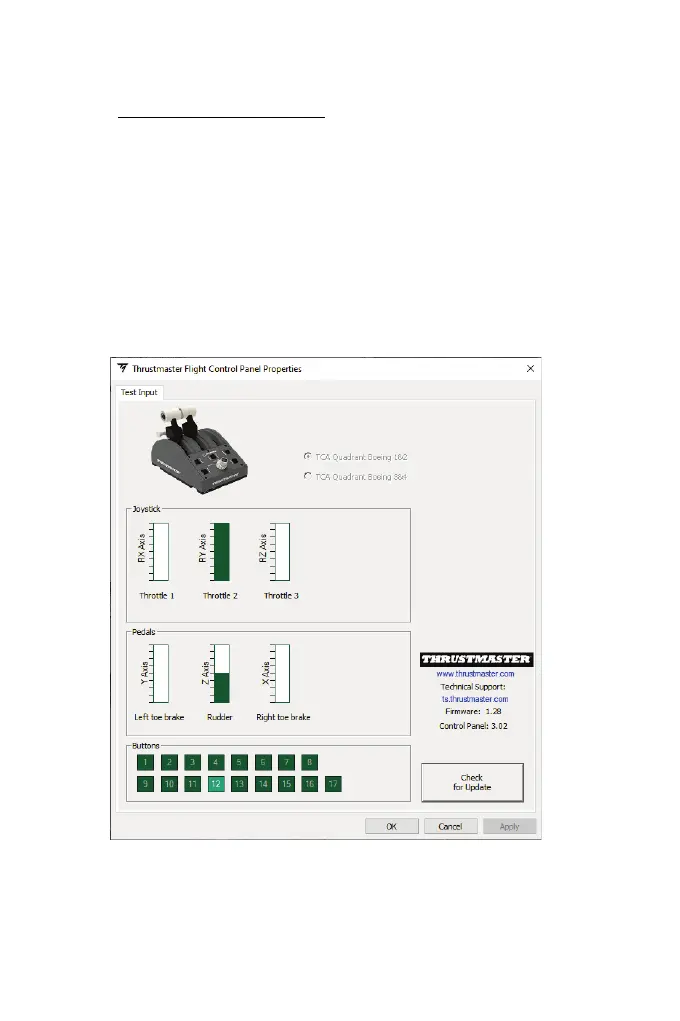
The Game Controllers dialogue box is displayed.
The device appears onscreen with the name TCA Q Boeing 1&2 (or TCA Q Boeing 3&4,
depending on the position of the engine selector switch (5)) and OK status.
4. In the Game Controllers dialogue box, click Properties to test and view all features.
You are now ready to play!














 To Next Page